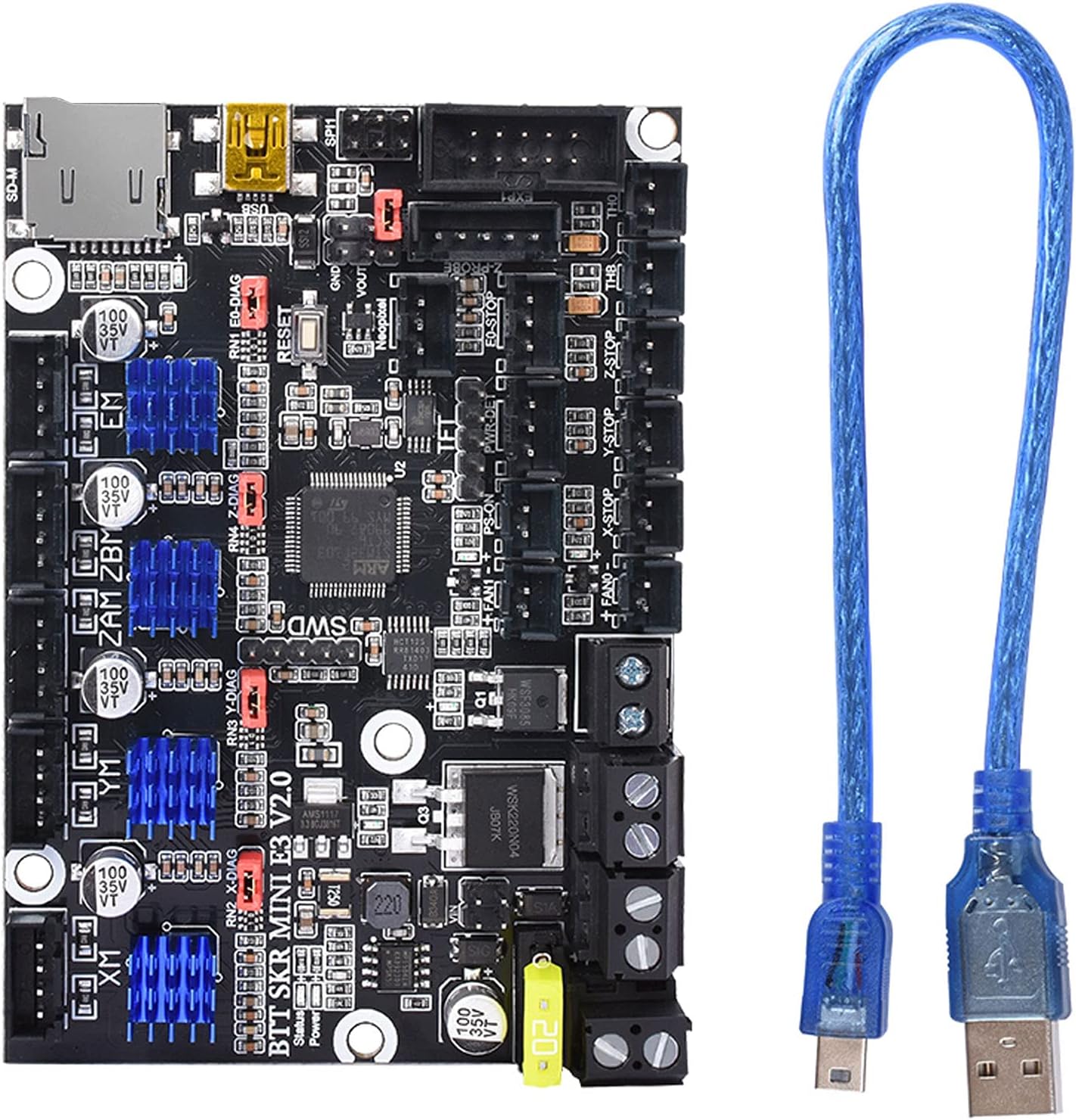

⚡ Upgrade your Ender 3 to stealth mode with BIGTREETECH’s silent powerhouse!
The BIGTREETECH SKR Mini E3 V2.0 is a 32-bit control board designed as a direct upgrade for Ender 3 series 3D printers. Featuring TMC2209 UART stepper drivers, it delivers ultra-quiet operation and enhanced precision. The board supports BLTouch auto bed leveling, filament detection, power-loss resume, and improved thermal management with a low-resistance MOSFET. Firmware updates are simplified via SD card, making it ideal for makers seeking advanced customization and reliable performance.


| ASIN | B0882QGFZR |
| Batteries required | No |
| Customer Reviews | 4.3 4.3 out of 5 stars (2,931) |
| Global Trade Identification Number | 00778416923359 |
| Included Components | BIGTREETECH SKR Mini E3 V2.0 Control Board |
| Is Discontinued By Manufacturer | No |
| Item Weight | 4.2 ounces |
| Item model number | 1 |
| Manufacturer | BIGTREETECH |
| Package Dimensions | 5.47 x 4.92 x 1.34 inches |
A**A
The BEST upgrade for Ender 3 Pro
This mainboard was by far the best upgrade to my Ender 3 Pro (MicroSwiss all-metal hotend is a close second). The TMC 2209 drivers make the steppers so quiet that I sometimes forget it is actually doing something (although there is the fan noise). The added space on the EEPROM was perfect for fitting all the features I wanted into my Marlin build (Linear Advance, Auto-Bed leveling, and Junction Deviation in particular). Not entirely sure why BIGTREETECH only lists 256KB...it is actually 512KB which allows me to compile 'bloaty' stuff (PIDBEDTEMP, M503, boot images, extra menu items for LCD, etc.) into the firmware and not have to worry about saving every last little byte. Installation wasn't difficult, but it was frustrating as Creality hot-glued everything to their stock board. Took a long time to get that stuff off without damaging anything. Came pre-loaded with a recent version of Marlin and was easy to flash to a custom build by simply dropping a 'firmeware.bin' file onto SD card and turning the printer on. A nice feature is that after it updates the firmware, it renames the file to 'firmware.cur' so it does not try to reflash every time you turn the printer on (the bootloader I flashed to my stock board didn't do this). BLTouch & Auto-Bed Leveling I did have some trouble configuring the firmware for ABL using the BLTouch at first. Most guides out there assume you are plugging into the Z-Stop on the board, but this board has the 5-pin header for BLTouch (which was convenient to build a 5-pin DuPont connector right to the board instead of separate 3-pin and 2-pin connectors). In your configuration.h, make sure that #define Z_MIN_PROBE_USES_Z_MIN_ENDSTOP_PIN is commented out and that you are using #define USE_PROBE_FOR_Z_HOMING. One other thing I had to change was #define Z_MIN_PROBE_PIN PC14. PC14 is the Z-endstop pin from the 5-pin header. The pin set to this by default will not work. In configuration_adv.h, PROBE_OFFSET_WIZARD is a really handy menu option to help set the z-probe offset value. There are other minor things you have to change to get ABL to work, but all the guides out there cover that in great detail. The Instruction Manual does include a link to pre-compiled Marlin binaries for this board. I believe from that page the 'firmware-bltouch.bin' would have worked for me using the 5-pin Z-Probe header, however the webpage is unclear and I wanted more control over what features were in my firmware. Would be nice if they supplied the configuration.h and configuration_adv.h files for these builds so that users know what's in them. Extra Stuff I bought the kit with the Mainboard, BLTouch and no touchscreen display. Be aware that the wires for the BLTouch probe are nowhere near long enough to reach your mainboard. You WILL have to do custom wiring or need to buy a BLTouch extension cable (1-meter should be long enough). This kit does NOT come with a bracket for the BLTouch either. I printed one out from Thingiverse and it works great, but if you prefer a metal bracket, you'll have to buy it separate from this. The kit does have appropriate screws/washers/springs to install the BLTouch. It is pretty clear in the description and pictures that it would not come with the bracket or long-enough cabling, however some folks might not notice or realize they need these things and be very disappointed. Overall a great board and an awesome upgrade that would really only be better if the documentation was more specific instead of a few pictures and incoherent sentences. In particular, configuring Marlin for BLTouch using this board's 5-pin header (notably the PC14 pin). Oddly, the BIGTREETECH configuration files specifically for this board on GitHub for Marlin do NOT have the pin defined as PC14. Despite a few challenges, this is still 5-stars all around because this upgrade is not designed for people who like for things to 'just work' or simple plug n' play. Go buy a more expensive printer if that is what you want.
M**9
Stealthchop is Magic, Silence is Golden
I got the SKR Mini E3 V2.0. At first, I was going to add a boot loader to the Creality stock board to add additional Marlin firmware features. Why bother? The SKR Mini E3 has all of that and is a really nice drop-in replacement for the Ender 3 Pro. It works well out of the box, but I ended up compiling the latest Marlin 2.0.6 firmware anyway. The boot loader makes it easy, just add firmware.bin to a flash card, insert and turn on the printer. The firmware loads in 10 seconds. Included is a 128 MB flash card that I use for this firmware.bin and nothing else. Compiling the firmware.bin with VSCode/PlatformIO requires watching Teaching Tech's youtube video. The attached pictures are from Teaching Tech and they helped me with the install wiring from old board to new. I am also using this new board with the stock Ender 3 display. No issues there and the original display works well with Marlin. Once you get this running, you will rejoice at how quiet the stepper motors are. The TMC 2209 drivers have everything to do with this. This is a great option to upgrade the motherboard and the price is better than the Creality Silent Board. A few of the options are moved around in Marlin firmware, like AutoHome and Preheat PLA, but once you find them, it is easy to work with. I love the mesh bed leveling feature where the firmware takes you to 9 different points on the bed, keeping the steppers locked, while using the display dial to control the Z motor axis to make tiny adjustments. Just keep the sheet of paper under the nozzle and feel away. Manual bed leveling was never this easy. The processor then auto-corrects for bed imperfections to get the best bed adhesion. Make sure that your Start GCode includes M420 S1 after G28 (G28 disables the mesh). I am using a borosilicate glass bed and there are indeed slight imperfections that this can accommodate for. This SKR Mini E3 V2.0 board rocks.
X**3
Probably the best upgrade for Ender 3 Pro
This is a detailed 2 part review please take time to read.... 1.) This board is amazing! Installation was a breeze just recommend to take a before photo of the old board wiring before beginning and then be sure to pay attention to the wiring diagram online from BTT and after a little bit of time compiling the firmware on the card and uploading to new board the printer runs like a dream. so quiet you don't even know its printing all you can hear are the fans cooling. I do recommend watching the video on installing this board and compiling the firmware that's on YouTube by Chris's Basement very helpful. 2.) Now on the back end of things the first board quit working after a few days couldn't get it to reset or work again even after re flashing the firmware. Amazon did replace free of charge and sent another out to me, however it was shipped in its own little box it was NOT placed into an amazon mailer of any kind no bubble mailor no outer box with cushioning there was nothing but a shipping label on the outside so of course the board was damaged in transit and I couldn't even use it. Since this was already a replacement sent out they could not send another one to me just a refund for the purchase price. This was ok however now I was left with no board for my printer and I purchased this board when it was on a one day sale and since the price had already increased again they could only refund the sale amount originally paid and now I must come up out of pocket the difference to re order one more time and hope for the best on the third attempt.
S**R
A great 32 bit 3d printer board that works great with the Creality Ender 3 Pro and fits the mounting screws in the original enclosure. However as there use external stepper drivers the heatsinks rest on the fan of the Creality enclosure. The fix is a simple case of unscrewing the enclosure slightly. But why bother with external stepper drivers ? If the stepper motor goes on a board with integrated drivers it's game over. But boards like the SKR E3 Dip, simply swap out the failed stepper driver and off you go again.
R**.
Ombouw Ender3
A**R
It seems I was either sent someone else's return, or the 'out of the box' experience here is just awful. The 'BL Touch' of theirs has no mounting hardware, no instructions, screws all loose in the box. The main-board is just in a brown cardboard box, was in an anti-static bag, no instructions, no anything. Just the board. I followed multiple guides (including their own Github info) and the device cant seem to be flashed. So its stuck with firmware that wont recognize the existing BLtouch I have etc. The whole exercise has just wasted weeks of time (delivery and return to the states), cant say i'd recommend this to anyone.
I**S
This is a perfect drop-in replacement for my Ender 5. I watched a couple of videos on Youtube but it is just as simple as plugging all the cables in the same place as the original board (apart from the fans which get swapped). I pulled down the latest Marlin firmware and used the Ender 5 configuration files, then applied the changes from the BigTreeTech GitHub. The screen plugs in simply and everything worked perfectly. I can't believe how quiet this has made it.
J**C
I used this to replace the dead 8-bit board of my old Prusa clone (HicTop 12) Note: You need to really know what you are doing, and have to be comfortable to crimp and solder your own cables if not using this for an Ender! Was overall very easy for me to install in my Prusa clone. The new drivers are amazing! Compared to the super old drivers from the old 8 Bit board these are virtually noiseless. I can actually sit in the same room and work when the printer is printing. Overall very positively surprised that the swap out went so smoothly. I cannot say anything about the MOSFET quality as I am using two separate big ones for bed and hot-end use. So no experiences using the on-board ones. Tip: Use separate big MOSFETs, they come cheap (2 pack for way below $30) and usually ready to use, with cable clamps etc., they reduce any heating issues, reduce fire issues and take any heat/power strain off the board. Bought mine on Amazon years ago, never regretted it. Pros: 1. Very compact design, in fact it is truly "mini" 2. Excellent drivers, make a noisy printer virtually silent, cooler included 3. Marlin 2.0 shines on this board 4. Works exceptionally well with my Orion Piezo auto leveller, I now get the bed perfectly levelled with 9-point in less than a minute. Every print's first layer is now pure art 5. Board build quality and online documentation ranges from very good to absolutely sufficient for such a competitively priced board. 6. Noticeably better performance with this 32-bit board. 7. Super easy to flash the firmware updates 8. Lots of people own this and there is quite a lot to google out there if you ever get stuck. Did not have to use their customer service once. Cons: 1. You should really be comfortable with configuring Marlin, soldering, cable crimping, etc. if you do not do a direct Ender board update but use this for a different printer. Because you will have to make at least some new cables and connectors. 2. Patience is necessary, as a move to a new board is never trivial, lots of fun (?) testing is necessary 3. Had to buy the Color TFT E3 V 2.0 from BT as well, as my old screen would just not work with the board, but, to be honest, totally worth the investment, as the TFT not only is a touch-screen but a very powerful mini Octoprint as well, among other things it has a rather useable terminal built-in. No more running back and forth between the computer with Octoprint and the printer.
Trustpilot
3 days ago
2 weeks ago