Buy anything from 5,000+ international stores. One checkout price. No surprise fees. Join 2M+ shoppers on Desertcart.
Desertcart purchases this item on your behalf and handles shipping, customs, and support to Vietnam.
🖼️ Relive every moment in stunning clarity—because your memories deserve the spotlight.
The 32GB FRAMEO 10.1 Inch Smart WiFi Digital Photo Frame features a vibrant 1280x800 IPS touchscreen with auto-rotate for portrait and landscape viewing. With built-in 32GB memory and expandable storage, it supports instant photo and short video sharing worldwide via the Frameo app. Designed for effortless use and seamless connectivity, it’s the perfect modern display to keep your cherished moments alive and shared.


| ASIN | B083SH697H |
| Aspect Ratio | 16:10 |
| Best Sellers Rank | #4 in Digital Picture Frames |
| Brand | akimart |
| Color | Black |
| Compatible Devices | Smartphone |
| Connectivity Technology | Wi-Fi |
| Control Method | Touch |
| Customer Reviews | 4.6 out of 5 stars 10,237 Reviews |
| Display Size | 10.1 Inches |
| Frame Material | Plastic |
| Item Dimensions L x W | 7"L x 9"W |
| Item Weight | 0.5 Kilograms |
| Manufacturer | akimart |
| Manufacturer Part Number | AKImart |
| Memory Storage Capacity | 32 GB |
| Model Number | ZN-DP1002 |
| Power Source | Corded Electric |
| Resolution | 1280 x 800 |
| Screen Size | 10.1 Inches |
| Touchscreen | Touchscreen |
| UPC | 639631023517 |
| Unit Count | 1.0 Count |
| Warranty Description | 1 Year |
D**R
Love this digital frame!
Love it! Great value for the money. Very easy to set up. Soo glad I got the larger screen. I enjoy watching my memories come across the screen all day long. Highly recommend. It makes a great gift!
K**.
Easy to Use and a Wonderful Way to Share Photos
The 32GB FRAMEO 10.1 Inch Smart WiFi Digital Frame has been a fantastic purchase. The picture quality is bright and clear, and it’s such a great way to keep favorite memories on display. Being able to send photos directly to the frame over WiFi makes it feel personal and fun, especially for family. Setup was simple, the app is easy to use, and the frame itself looks great in any room. The 32GB storage gives plenty of space for photos, and everything runs smoothly. It’s a thoughtful, modern gift and a great addition to the home.
C**L
Excellent frame, excellent price.
For my modest needs this is the perfect digital frame. I do not need the WiFi even though it comes with and is super easy to set up. I just want to be able to load a USB or card once a year with all the photos from the previous year. That’s all. You would not believe how difficult it is to find a frame that simple, and if you do it will still be expensive because of all the bells and whistles you won’t be using. I don’t need comments or emojis etc. This frame is very easy to use, it’s got a really lovely picture, it’s a nice size for a table top and I can not recommend it enough. Stick with Frameo, you won’t be sorry. I just bought two new ones and could not be more satisfied.
L**N
Purchased as a gift and we liked it so much, we got one for ourselves
We purchased one of these for my mother-in-law for Christmas and one for ourselves after we add a great experience, preloading her frame with photos. As we sat there, looking at the photos rolling through, we decided we were really enjoying seeing them on a much larger screen than our phones and decided to purchase one for our home. We love the fact that you can add thousands of photos. This is a great value and I love just randomly looking up and seeing a memory from 10 years ago. You can swipe on the screen itself to go left and right to scroll through the photos. This is a great gift item for any seniors as they are somewhat restricted in mobility, and you can add images remotely. In fact, you can give a link to other family members so they can upload images to the frame as well. Now that we’ve had it for several months, I could tell you firsthand it is well worth the price and is quite easy to use . We love it!
A**N
Good display, easy to use, but lacks subfolders to separate photos into useful collections
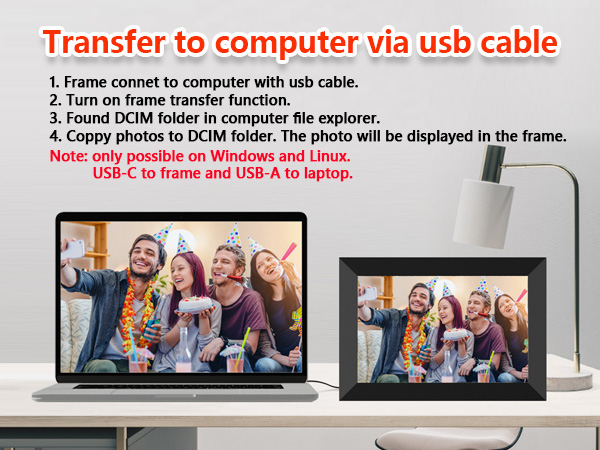
This Frameo digital frame replaced an ancient Brookstone model that I have used for 20 years. That one was only 640x480 resolution, but this new one is 1280x800. (I had to figure this out for myself, it's not detailed in the printed user manual that is otherwise very useful). I re-scale me frame images to the precise resolution of the frame, so it would be helpful if the native resolution had been noted in the user manual. The normal resolution for displays in this category of "HD" is 1280x720, so the frame must be set to not vertically stretch photos to fill the frame. If not set properly, circles will appear as ovals. It would be better to have the default set to maintain the proper aspect ratio of each image. The frame has a setting to determine how the surrounding area of a non-stretched photo will appear. The choices include black as well as a color that suits the overall tone of each photo. The setup process to send images via phone was simple and fast. I sent a sample photo from my phone and it appeared in the frame in just a few seconds. I then connected the frame to my computer via USB so I could transfer my screensaver folders. I copied my screensaver folders into a top level older named DCIM as noted in the user manual. I was pleased that the multi-Gb transfer moved very quickly. But then my disappointment began. Turns out that although the frame has 32G of memory, ALL of the photos to be viewed must be stored in the single top level folder DCIM. I have thousands of photos in my collection, separated into folders based on people, places, events, etc. My ancient Brookstone frame could display all the photos in all subfolders, or from only one subfolder. This new Frameo frame can hold images in subfolders, but they can't be viewed unless moved into the main image folder using a USB connection to a computer. To me, having 32G of photos in one huge folder is a very poor design choice. Also, although the frame supports an external SD card, the frame cannot display images directly from the card. The image files must be transferred from the SD into internal memory. My old Brookstone supported image display directly from everal types of external memory, including SD and USB sticks. So having a few USB sticks with images for specific occasions was a simple and low cost solution. But with the Frameo, manual transfer of external images is required every time they are used. I know enough about small computers and programming to appreciate how little effort it would take to design the frame to use subfolders and or external memory. I contacted the company and received a prompt response explaining that subfolders are not available but would be a useful update. I doubt it will happen, but maybe one day a firmware update will provide what I consider to be a basic feature for a 32GB digital photo frame. Otherwise, it's a nice frame considering the low cost. But with a few tweaks it could be much better.
J**C
Easy to Use and Great Gift Idea
This digital photo frame is a great gift idea! Had no trouble connecting, uploading, receiving photos. Super easy to use. Was compatible with WiFi, received photos and they were ready to view quickly. Looks good and I highly recommend it.
S**H
Easy and free to set up and use.
I got this for my girlfriend’s parents for Christmas. It was easy to set up and they have it in the kitchen. Great value and good product. Best part is the ease of use with the free app.
E**A
A versatile digital picture frame, very nice for the money.
My brother had purchased one of these digital picture frames for our parents several years ago - not being technically minded, they never used it. My mother passed a few years back, and I have been taking care of my father. I saw the frame still in the box and set it up, he loved it, and surprise, there were pictures loaded on that we had never seen. However due to old technology, about 130 pics was the maximum it would hold. My fathers birthday was approaching so I decided to upgrade to this Frameo model - I think they said it will hold something like 10,000 pictures. But what was most important was that my brother could add photos remotely, which is good as my father does not get down as often as he would like to see the grand kids. The build quality seems pretty good, the software functions as it should, and it even plays short video clips with sound. I would certainly recommend this frame - it has been running steady for a few weeks, and when I went to take the pictures for this review there was a note on the screen saying the software had been updated. You also get a notification when new pictures have been added so you can skip to them for immediate viewing. There is a stand that snaps on the back, or you can hang it on the wall. I probably should not have been doing this, but I like playing with PhotoShop and to that end I have inserted my father (or at least his face) in to several old photographs. The first was him bending down to pick something up, I grafted that in to a photo of Jerry Garcia setting up for a small show in the late 60's or early 70's... then there was a photo of a man and his 13 kids taken in the 50's or 40s probably, Appalachia or West Virginia I think... for a few days he kept mumbling something about not knowing who these people are. He finally figured out what was going on when I slipped him in to the photo of LBJ being sworn in on the airplane. He realized he was never there... I said I would take them out, he said, no leave them. I think he want's to mess with others that come in and see the frame.
Trustpilot
1 month ago
2 months ago