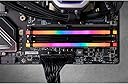


🌈 Light up your performance — RGB RAM that means business!
The CORSAIR VENGEANCE RGB PRO DDR4 RAM 64GB (2x32GB) kit delivers high-speed 3600MHz memory with low 1.35V power consumption, featuring ten individually addressable RGB LEDs per module for stunning customizable lighting. Compatible with both Intel and AMD platforms, it offers a wire-free design for clean installation and is engineered with a custom PCB and screened ICs to ensure top-tier stability and overclocking potential.


| ASIN | B081BTFN1B |
| Additional Features | Led Lights, Lightweight |
| Best Sellers Rank | #478 in Computer Memory |
| Brand | Corsair |
| Column Address Strobe Latency | 18 |
| Compatible Devices | Desktop |
| Computer Memory Size | 64 GB |
| Customer Reviews | 4.8 out of 5 stars 1,442 Reviews |
| Data Transfer Rate | 3600 Megabits Per Second |
| Form Factor | DIMM |
| Global Trade Identification Number | 00840006620785 |
| Item Type Name | Memory |
| Item Weight | 0.16 Kilograms |
| Manufacturer | CORSAIR |
| Memory Form Factor | DIMM |
| Memory Generation | DDR4 |
| Memory Speed | 3600 MHz |
| Mfr Part Number | CMW64GX4M2D3600C18 |
| Model Name | Corsair Vengeance RGB PRO |
| Model Number | CMW64GX4M2D3600C18 |
| Number of Pins | 288 |
| RAM Memory Technology | DDR4 |
| RAM Size | 64 GB |
| Special Feature | Led Lights , Lightweight |
| UPC | 840006620785 |
| Voltage | 1.35 Volts |
| Warranty Description | Limited Lifetime |
A**R
Best RGB Options I’ve Seen on DDR4
Installation was quick, my system recognized it instantly, and performance has been super smooth faster loading, better multitasking, no issues at all. The RGB lighting is honestly one of the best parts. The colors look amazing, super bright and clean, and there are tons of lighting choices to customize your setup exactly how you want it. It syncs perfectly and really makes the whole build look next-level. Solid RAM with great speed and some of the nicest lighting effects out there. Definitely worth the upgrade.
A**S
High Quality DD4 Memory, ..and...Pretty too!
This is a great upgrade, especially since the advent of local AI's consuming all of your systems VRAM and DRAM. My system was upgraded from 4 x 8GB (32GB) ram to two of these (64GB); I then continued to use two of my 8GB to bring my total system memory to 80GB of DRAM. Despite the RAM (potential) mismatch, everything is fine even under the highest loads. These are clearly high quality memory modules, and a step up from the random low-cost stuff; so go ahead and spend perhaps very slightly more when moving your system memory above 32GB. They came well packaged and well protected against drop/vibration and ESD. And the fancy colors dont hurt! (Their default colors are OK with me, but software is avaialble for you to tune the colors to just about anything). When my memory needs increase further (they likely will), I'll immediately and without hesitation purchase another 64GB kit. Highly recommended.
Z**A
Excellent performance, good looking RGB
I previously had the same Corsair memory in a 32GB (2x16GB) configuration and wanted to upgrade to 64GB so got this kit, it works great, looks good and performs awesome. Hard to complain when you have 64GB in your system, it's fast and awesome. The only thing that is a negative is the Corsair ICUE software which is fairly terrible to manage the RGB but other than that this memory is rock solid.
A**X
Works with Alienware Aurora R12 with i5-11400F
I was a bit nervous with all the people saying that it’s hard to find memory that works with Alienware computers and i am happy to report this memory works great. First thing i did before opening the case was upgrading the bios to current 1.1.1, then i went in and set XMP to disabled. Pictures show my original memory 2x8GB sticks running at 2660 and their timings. This was with XMP disabled. (for reference it was at 3200MHz with XMP profile 2 selected) When i installed this new memory (2x32GB 3600MHZ) it took a scary long time and then the display showed me the page that tells me the memory amount changed. I then went into BIOS to take a look and it all looked OK. before i exited i went to see what XMP options i had and it already selected XMP 1 Profile. I though i would just go with it and see what happens. The computer then booted normally and when i checked the memory stats i was surprised to see that this is now running at the full speed of 3458MHz (max for the dell Alienware motherboard). This is a 30% increase in speed over the Non XMP profile of the original memory. I have tried several applications so far and all seems to be working great. If you have an R12 then this is great. I also removed the old memory completely because i didn’t want to mix and match chips so this was a complete swap. If you try to add this to your existing memory then your results may vary. My computer is working great so I’m not going to see what happens if i add in the old memory.
J**N
Step aside 16gb
Why settle for 16 when you can have 32? Why settle when you can have 64 instead of 32? Exactly. In pc terms, it’s always nice to have an upgrade path. While this is still DDR4, it’s a whole lot of it. On top of that, you still have the option to upgrade to 128 gigs of ram if the need ever arises. The RGB on these look great and had 0 issues syncing this to my non Corsair system. Build quality is great and these ram sticks feel substantial Don’t forget to adjust your bios xmp profile after install!!
A**7
A bit taller than other brands but works well and looks good
When I ordered this make/model I didn't realize that it would hit the radiator fan at the top of my case so I did need to remove one fan and grind off about 1/4 inch of the the corner which meant I could not screw down in that corner any more. The fan sits snug anyway so not a big deal but just be aware of the height before purchasing, which is slightly taller than G.Skill and others I have used. In fact this may be the tallest memory I have used. Still I was able to configure XMP profile at 3600 for the pair and it runs stable gaming on windows with my 12 core Ryzen 9 CPU and now I have plenty of room to tinker with VM's and LLM's on my PC which are memory hungry.
C**Y
Excellent RAM, runs great at the 3600Mhz spec
Installed this Corsair Vengeance RGB Pro 64GB 3600Mhz kit into an AMD system, 5900X Ryzen 9 CPU. I bought the kit to replace faulty RAM that decided to flake out after 2 years of use...failed memory diagnostic tests. First and foremost, if you're installing this into a ROG Strix X570-E gaming motherboard, make sure you install the 2 sticks into slots 2 and 4 (farthest from CPU) otherwise the motherboard won't post when enabling D.O.C.P. mode to get the 3600Mhz out of the RAM. Other motherboards may have similar requirements, so consult your motherboard owner's manual to double-check. If you're using all 4 RAM slots, not an issue. Overall, the Corsair Vengeance RGB Pro runs at the advertised 3600Mhz in DOCP mode on AMD systems. Gives a small boost over 3200Mhz DDR4. Overclock at your own risk.
S**E
Quality RAM as always from Corsair
These DIMMs were plug and play. BIOS immediately recognized them and XMP profile was correctly identified as 3600. Been running rock solid in Windows with no issues since installation. Color customization options in iCUE are decent and the LEDs are pretty bright.
B**A
Fonctionne parfaitement ++
Impeccable !
ط**ق
ممتاز
ممتاز ل DDR4
M**W
Taniej już nie będzie
Szybkie i tanie w momencie zakupu
B**N
Giid and stable
Good RAM. Matched perfectly with X570 MB and Ryzen 5900X
K**様
ちゃんとXMP3600で動くメモリ
評価の高いPatriotメモリー2種類、PVE2464G360C0K PVB464G360C8Kを試しましたが、XMPで3600ではまったく動かない。 最後の頼みで注文したこちらのコルセアメモリでしたが、やっと駆動することが出来た。 もしかしたらもっと高速で動くのかもしれないが、やっと一安心。 海外からくるので到着に一週間以上かかるが、これはおススメです。
Trustpilot
1 month ago
1 month ago