Buy anything from 5,000+ international stores. One checkout price. No surprise fees. Join 2M+ shoppers on Desertcart.
Desertcart purchases this item on your behalf and handles shipping, customs, and support to Vietnam.
🚀 Boost your display game to 8K heights—because your setup deserves the best!
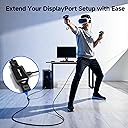
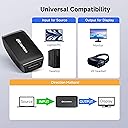
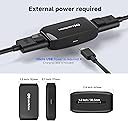
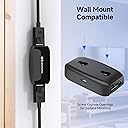
The Cable Matters Active 8K DisplayPort Repeater 1.4 is a compact, powered signal booster designed to extend DisplayPort cable runs up to 24.4 meters while maintaining pristine 8K@60Hz video and multi-channel audio quality. Supporting DisplayPort 1.4 features like HBR3 bandwidth (32.4Gbps) and FEC, it ensures stable, high-fidelity connections for VR headsets, gaming monitors, and projectors. Its plug-and-play design with external Micro-USB power and versatile mounting options make it an essential upgrade for professional and enthusiast setups demanding flawless long-distance DisplayPort performance.


| ASIN | B07D949F59 |
| Best Sellers Rank | 58,691 in Computers & Accessories ( See Top 100 in Computers & Accessories ) 431 in Network Repeaters |
| Box Contents | Cable |
| Brand Name | Cable Matters |
| Colour | Black |
| Compatible Devices | Computers, Laptops, Monitors, Projectors, VR Headsets |
| Connector Type | DisplayPort |
| Country of Origin | China |
| Customer Reviews | 4.3 4.3 out of 5 stars (924) |
| Input Voltage | 5 Volts (DC) |
| Item Dimensions | 6 x 3.2 x 1.5 centimetres |
| Item Weight | 0.07 Kilograms |
| Manufacturer | Cable Matters |
| Manufacturer Part Number | 102039 |
| Model Number | 102039 |
| Number of Items | 1 |
| Number of Ports | 3 |
| Package Quantity | 1 |
| Power Plug Type | Type B - 3 pin (North American) |
| Smart Home Compatibility | Not Smart Home Compatible |
| Specific Uses For Product | Computers, Laptops, Monitors, Projectors, VR Headsets |
| UPC | 818707023624 |
| Unit Count | 1.0 count |
J**Y
Solid and still working well after a year
Have had this in place for over a year. Does the job well as I've got a cable run that exceeds single cable length recommended distance. Thankful I don't need to work from home with noisy pc at my desk!
G**D
Works as promised
Works as promised
P**T
Works well with one major issue
I purchased 3 of these for my 3 monitors on my gaming PC. I was moving my PC to the otherside of the room and after it was all setup nothing worked. Unplugging and replugging things and eventually got one of them working after which I noticed that while everything is plugged in and powered on, you have to power the repeater off and on (just by unplugging and re-plugging the power). This isn't a huge issue for me as I have a remote to control a few plugs, however I do have to turn the power supply off and on for these repeaters whenever I reboot. Again, this is better than having the computer where it was before so it's something I can live with, but not ideal. As for the result, everything works, no perceivable delay (did a reaction test with and without these and got similar/identical results), G-sync works and running at full 2560x1440 @ 165hz on all 3 screens. Pros: no perceivable dip in performance, in terms of resolution, refresh rate, latency or features. Power cable included. Cons: has to be turned off and on after each reboot once you reach the login screen.
S**N
Works!
Update: seems that it does not pass through the resolution, I have a 240hz monitor and the most I can get is 120hz, keep experimenting with windows/nvidia I guess, was 60hz at first. Having a five metre cable between my PC and monitor resulted in black screen glitches, even switching to a four metre cable I got them, often enough to be annoying. As I have some USB connectors on my Asus monitor I can plug this device in without needing another long USB cable to power the device, keeping it very tidy. I used the same four metre cable from my PC into the device, put a new 50cm cable out to monitor - not one glitch since then. I always wondered why a monitor would have USB connectors, turns out they came it handy afterall. Money well spent.
D**L
5m cable > Repeater > 5m cable at 144Hz 1440p works great!
Thought I'd leave a review as a lot of items claiming to do similar things sometimes just don't work. However, I've got these running 5m DP cable in and 5m DP cable out at 144hz 1440p with G-SYNC without any issues at all. I haven't had any of the problems some other reviews have mentioned like needing to turn them off / on after power cycling the PC. I used high quality DP cables without VESA certification and they worked just fine. I overspecced everything to 8K standards to leave room for upgrades later.
M**C
Works….. BUT
Please Read if you are having to power the device off and back on when you are at logon screen! Purchased this repeater because I have a Samsung G9 monitor and a kvm switch in between the monitor and pc It turns out that even a high quality kvm doesn’t have the ability to send the G9 resolution at any hz above 60hz even though the total cable length is below 9ft vesa certified cables Needed a repeater to boost the signal to get maximum resolution and maximum hz of the G9 Update Although my g9 setup is working fine with no issues, I purchased two more of these repeaters for another pc setup but on this pc the repeaters have to be powered off from any usb power when the pc gets to windows logon screen just to get a display to show Even though both systems are wired the same minus the kvm switch on the second Pc they are behaving differently, I have reduced my score rating because these repeaters should not have to be powered off at every boot up of a pc Update on powering the device Off and On at windows login screen The issue is that the screen that the repeater is connected to is defaulting back to 60hz during bios and bootup screens and when the windows login screen appears the screen is switching to a hz higher than 60hz ie 120hz or 144hz; which is what windows is set to If you have for "example" Samsung g9 120hz screen this screen will maintain a 120hz throughout Bios and Bootup screens (even if screen was powered off) which will then allow Windows logon screen to be seen assuming windows is set to 120hz but if you have a screen that changes to 60hz during bios or bootup screens and then changes to match the settings inside windows then you will get a black screen at windows logon and will have to power off the device and back on for it to accept the hz change There is no real way around this issue other than setting you display in windows to 60hz but this impractical for gaming purposes, any change to lower the hz before shutdown and then to increase the hz after powerup and logon will require the repeater to be power cycled again I tried "schedule task" a third party application to change to 60hz at shutdown but this failed for me as the program can't run when shutdown has been initiated and I do not want a shutdown bat file on my desktop just to solve this issue, bootup would have been simple home assistant trigger to power cycle the device after logon and schedule task the third party application to change to the higher hz needed I did contact Cable Matters Support team about this issue I have solved my issue by purchasing Club3d DisplaPort 1.4 active Repeaters, these don’t seem to be affected by the hz/refresh rate change during boot up to windows
E**S
Works great with Valve Index
This little gadget is the only way I could get a picture in my Valve Index 10 meters away from the PC it's connected to (source port is an MSI 3080 Ti Suprim X). It works even at max refresh rate (144 Hz) without any artefacts nor sound issues of any kind - it feels just like using a normal cable. I'm using it with a standard, cheap passive 10m DP cable from KabelDirekt. The combination costs ~£30 in total which seems quite reasonable given the length. This is a very different experience from the 10m DP active cable from the same brand which does NOT work (no signal).
S**N
Solved my incompatibility issue with my HP Reverb G2 v2 and Nvidia RTX 3090ti
There is an issue with the new RTX 3090ti GPU's display port output when paired with some VR headsets. The problem is the weak output from the display port end of the GPU which causes the VR headset not to function. After installing this DP repeater with a DP cable I can confirm everything is now working well as it should. So anyone facing the same issue, I highly recommend you try this solution.
あ**ね
3mのDP延長と一緒にINDEXの延長に使っていますが問題なく使用できています。ケーブルはDP1.4で3m1000円程度の中華製ケーブルです。補助電源として5Vが必要になります。
J**Y
UPDATE: Turns out i had a dead outlet in my powerbar. Swapped out to a new one and any brick i used for it powered it and the signal without issue. Tried 5 diffeerent power bricks and plugged into computer and 5 different cables in many configs using all displayports that my GFX card has. Did not extend my signal. The USB cable I bought together as a package (I assume most are seeing thiss due to that package) works great as does the displayport cable that came with the package on it's own. This extender is the thing that didn't work. Blue LED goes on but nothing.
L**.
Utilisé pour booster le signal d'un cable Displayport de 7.5m qui me donnait de temps en temps de écran noir. J'ai mis ce répéteur + un cable de 2m livré avec l'écran (9.5 m au total) et depuis, plus de soucis. Pour le moment je ne suis que sur un écran de 4K60p. Le produit est compact et l'alimentation par le cable USB est fourni par le hub de l'écran (ce qui fait que l'écran ne s'allume pas automatiquement par le signal DP, car pas d'alim sur le hub au départ).
A**R
Works like a charm to make sure the displays of the Varjo Aero comes on when using an Nvidia 5090 👍
G**S
This works as intended
Trustpilot
5 days ago
2 weeks ago