Buy anything from 5,000+ international stores. One checkout price. No surprise fees. Join 2M+ shoppers on Desertcart.
Desertcart purchases this item on your behalf and handles shipping, customs, and support to Vietnam.
🔥 Level up your game with precision and power at your fingertips!
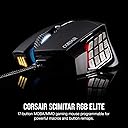
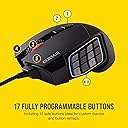
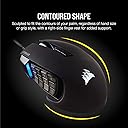
The Corsair Scimitar RGB Elite is a wired MOBA/MMO gaming mouse featuring 17 fully programmable buttons, a patented adjustable side button slider, and a native 18,000 DPI PixArt optical sensor. Designed for ultimate comfort and durability, it boasts 50 million click-rated Omron switches and dynamic four-zone RGB lighting controlled via CORSAIR iCUE software. Compatible across PC, Mac, and major consoles, it’s engineered to elevate both gaming and productivity with customizable profiles and robust build quality.


| ASIN | B082LRMY53 |
| Additional Features | Key Slider Side Panel |
| Antenna Location | Gaming, Office |
| Are Batteries Included | No |
| Are Batteries Required | No |
| Best Sellers Rank | #515 in Video Games ( See Top 100 in Video Games ) #34 in PC Gaming Mice |
| Brand | Corsair |
| Button Quantity | 17 |
| Color | Black |
| Compatible Devices | Personal Computer |
| Connectivity Technology | Bluetooth, Wired |
| Customer Reviews | 4.2 out of 5 stars 3,989 Reviews |
| Embellishment Feature | LED |
| Enclosure Material | Plastic |
| Hand Orientation | Right |
| Hardware Platform | PC |
| Item Dimensions L x W | 6.89"L x 4.49"W |
| Item Type Name | CORSAIR SCIMITAR RGB ELITE, MOBA/MMO Gaming Mouse, Black, Backlit RGB LED, 18000 DPI, Optical |
| Item Weight | 122 Grams |
| Manufacturer | Corsair |
| Mfr Part Number | CH-9304211-NA |
| Minimum Required Operating System Version | Windows 10 |
| Model Name | SCIMITAR RGB ELITE |
| Model Number | CH-9304211-NA |
| Mouse Maximum Sensitivity | 18000 Dots per Inch |
| Movement Detection | Optical |
| Movement Detection Technology | Optical |
| Number of Batteries | 1 AA batteries required. |
| Number of Buttons | 17 |
| Operating System | Windows |
| Pattern | Gaming Mouse |
| Power Source | Corded Electric |
| Range | 1.0 meters |
| Special Feature | Key Slider Side Panel |
| Style Name | Wired |
| Theme | Car |
| UPC | 840006616221 |
| Unit Count | 1.0 Count |
| Warranty Description | 2 Years |
J**Y
Love this mouse.
So, I've owned 3 of these over the last 7 years. My first purchase of it was at another retailer in 2017 (when I first got into Final Fantasy XIV and wanted an MMO-style mouse) and my second was also from another retailer in 2020. I use one on my desktop and one for my laptop. My desktop one croaked after 8 years of service, and so I bought another one, from Amazon this time (Prime Day Deals, thank goodness). Pros 1. Good weight. Not too heavy, not too light (for me at least). 2. Lighting is nice without being overbearing. 3. Works with iCue without any issues. 4. I use mine for productivity and work, so I actually do use the profiles on iCue, and being able to swap from gaming to productivity with a button press (with different lights to tell me what profile I'm using) is supremely useful. 5. Scroll wheel feels good. Nice weight, dampened clicks. Feels premium (I've opened it up, it's not, but it feels good). 6. Good clicks and the side buttons are easy for my thumb to reach and hit. 7. The side number pad was very good for intermediate-level MMO play. I ended up doing a funky hotkey setup for endgame that used mostly my keyboard, but the mouse did good for the original purposes I bought it for. Cons 1. It's not easy to clean. The rubber parts get grimy with human hand oils n such, and rubber is just rough to clean anyway, especially with the triangle texture. In any case, for my level of gaming and productivity, these are virtually perfect. When my 8-year old one bit the dust, I immediately bought another and set it up the same way as the one that croaked, and I'll probably keep buying them until Corsair stops making them. There are better mice for specific applications, but this one fits me and what I do no problem.
T**A
Excellent, Affordable, Mouse for MMOs
I play WoW, like most folks looking at this mouse, and wanted to not be handicapped all the time by hitting the number keys on my keyboard. This mouse is THE SOLUTION. It works great, looks good, and the software is intuitive and simple. I had it all up and running in under 15 mins, and I'm 100% not a computer-savvy person at all. I love that it's wired so I don't have to worry about charging. The programmable lights are great and now the red LED glow matches my tower, very cool. The movable 12-key pad is convenient, but for bigger hands (L or XL men's size) you'll be maxing it out and probably could use another 1/2 inch forward, but it's totally serviceable. Glides smooth over my regular trackpad, and the weight and grip seems standard for gaming mouses. No complaints. Admittedly, I bought this and thought I would becoming a PvP arena god overnight... It takes some getting used to. Like playing an instrument, knowing intuitively which key is #7 compared to #3 or #12 takes some practice. But I've been using it 2-3 hours a day over the last week and already I'm 2x as fast and more accurate than when I started. In a month of regular use, anybody could master it. Looking forward to being that arena god one day ;) Lastly! I love that this mouse is designed in Milpitas, California and has software from a reputable company not looking to steal your information. Not pointing any fingers at anyone, but there are some cheaper MMO-mouses on the market that I wouldn't want to install that software on my computer or touch it with a ten-foot-pole... Be MINDFUL of where your products and software are coming from, especially when the difference is just 20 bucks. Just a heads up. Stay safe out there, and see you in Azeroth.
B**B
Purchased in June 2022, January 2025 now and it's still going strong.
Purchased in June 2022, January 2025 now and it's still going strong. Compared to my wife's mouse whose "G6" broke off of her Logitech G604 after only a week of light use, I'd say that's a pretty good deal. I play WoW and use the mouse buttons for my rotation. What does that mean for non-WoW players? It means I smash these buttons thousands of times per gaming session, and I game every day. It's a great mouse and in hindsight I never expected it to last so long with how I use it. I'm actually only here because my wife now wants one too, so I figured I'd spread the good word. So yeah, excellent build quality, very tough, and if I had to criticize one thing it would just be the iCue software. Sometimes it just deletes itself randomly and that's kinda annoying, but I just keep the installation exe in my download folder and use that to fix it, so it's a quick and easy thing to rectify. I honestly can't recommend any other mouse so if you're here and reading this, Corsair SCIMITAR is the way to go. And no, I'm not being paid for this review but hey, if you're reading this too Corsair, hmu, I wouldn't mind having a backup mouse just in case lol
D**N
Downgrade from the discontinued Logitech G600 but gets the job done
Pros: Has 12 side buttons like the G600. It's comfortable and you're able to move the side buttons. Cons: No left or right click for middle mouse button. Software is slightly worse than Logitech's; You have to manually add game profiles. Logitech lets you scan your PC and adds them automatically. Remapping side buttons isn't as intuitive as Logitech - it doesn't show your remaps overlayed on each button like Logitech does. Side buttons 1-6 and 7-12 aren't shaped in a way that lets you easily "feel" them like the G600; the buttons are relatively flat whereas Logitech's 1-6 and 7-12 buttons had a concave shape and also had a line on 5 and 8 so you knew where your fingers were ( same as the line on the F and J of your keyboard ) This is why the Logitech G600 was the best MMO mouse but was sadly discontinued. You can still buy it on Ebay from Japan but for close to $100 which is more than I'm willing to pay for a mouse. The Scimitar is fine and gets the job done but is a downgrade if you're coming from the G600.
J**Y
Great mouse, horrible software
Update: I am lowering my initial score lower due to the middle mouse wheel starting to fail. The mouse wheel will slip and either not register the movement, or slip backwards in the opposite direction. It should go without saying, that for gaming this is completely unacceptable. Looking at reviews and comments this appears to be so consistent it should be considered a feature of the mouse. You can temporarily "fix" this by disassembling the mouse and greasing the mouse wheel, but it seems that people end up having to do this every few months once it starts, honestly it is not worth my time to do that. Strangely, the software has gotten slightly better, at least up until the most recent update, where it started to fail again. It has been more reliable most of the time, but I doubt the initial setup has gotten any better. As things stand right now, within about a year you will have to buy a new mouse or start doing frequent maintenance where you have to disassemble the mouse. Between the short life of the middle mouse wheel, and the software still not being that great, I would strongly recommend against this mouse. Mouse: 1/10 iCue: 3/10 Original Review: The mouse itself is great. It feels good in the hand and the adjustable keypad is very convenient. The only issue that I have with the mouse itself is that the scroll wheel does not operate like a back and forward button (no left / right movement). But that is a minor gripe when coming from the logitech G600. I do like that you can see the DPI via the color of the LED at the thumb, that is a nice feature. The single biggest failure of the mouse is the iCUE software. Now to start off I have used iCUE for awhile now, I have a corsair keyboard and LED fans, so I do use the software quite a bit. But for whatever reason they made the mouse interactions extremely dumb. Everything from needing to manually program every button in the default profile (because why would you want to use the number keys?) to the hardware profiles not really saving (if they save they are corrupt and get reset when you start iCUE again). Every time that my screen locks, I lose access to the number keys. This would be helpful for signing into my desktop, but not the end of the world. The real annoying part is when you do login the profile that should be loaded on to the mouse gets loaded, due to the way the communication protocol works for USB devices the mouse itself goes unresponsive for a few seconds. All that being said, I think my biggest problem with the iCUE software is that profiles are completely isolated and do not have any sort of stacking. Not really a big issue if you are only using a mouse or keyboard. Kinda a big issue when you have multiple devices and LEDs being controlled by the software. Ultimately if you hit the change profile button on the mouse (and you will, a lot), you go to a blank profile that basically turns everything off. Overall the software is not well thought out and not user friendly. Mouse: 4/10 iCUE Software: 0/10
M**I
Feels and plays great! Love the buttery yet snappy clicks.
I loved my Logitech MMO mouse deeply. I've burned through two of them through the past 18 years playing World of Warcraft and everyday computing. However, Logitech discontinued manufacturing the mouse a while ago, and finding one that isn't used is very hard to find. I finally had to look for something comparable from another manufacturer. There are very few manufacturers that make a side-button MMO mouse nowadays. The first one I tried was from Red Dragon. While good, it gave me hand fatigue. I still have it, it's a good mouse, but I decided to keep looking. I picked up the Corsair's Scimitar because of the good reviews it had received here on Amazon. I can honestly say that reviews are accurate, the good and the meh. Mostly, this is an excellent mouse and I highly recommend it. It fits my hand better and the clicks feel so good. The software looks sharp, but it's dorky to use. I am not a fan. Yet, I managed to stumble through and make it work. If there's a roadblock to successfully using the Scimitar mouse, it's the software. I don't like it. It's not intuitive. The mouse itself is excellent. The adjustable sliding side buttons help to find the sweet spot for my thumb to be happy clicking away without fatigue. The click feels GREAT. I honestly fell in love when I made my first clicks. I can't explain it but it feels great! Buttery yet snappy is the best way I can describe it. After several weeks of raiding with the Scimitar, I can honestly say I love this mouse. No regrets. I'm thrilled to have found a great replacement for my old Logitech MMO mouse. The Scimitar by Corsair is fantastic to play with. It's snappy and responsive. I have no problems to report other than the cool-looking but non-intuitive software needed to re-program the buttons.
J**S
Best Mouse!
My go-to mouse! I play Minecraft and the many side buttons work amazingly well for hotkeys! I really do love this mouse and it feels nice in hand! Quality product.
J**N
Great foundations, held back by some flaws
I am a big believer in the value of “MMO” mice, in basically every genre of games, including FPS’s. With those side buttons on the mouse, you never need to take your fingers off WASD to switch weapons or use abilities, so you never need to stop moving – it provides a concrete advantage. Sadly, the quality of MMO mice has been dropping over the last couple of years. The Razer Naga would only last me a year, and I went through three of them before I decided to try the Corsair Scimitar. I got my first one years ago, back when the mouse still had yellow accents. The software was clunky, and it still is, though it has gotten better. However, after about a year, the scroll wheel broke. I tried a Logitech mouse at the recommendation of my friends, but it was too small for my hands and it gave me cramps. The Scimitar is certainly comfortable, and I definitely appreciate that I can move the side keypad. So I went back to the Scimitar. I bought a used one that had been repaired, and it only took a handful of weeks before the scroll wheel broke. On their forums, Corsair has insisted that there are no manufacturing defects with the Scimitar. A cursory google search about scroll wheel breakage will reveal that this isn’t so - it happens often enough for there to be plenty of reports of exactly this issue. In fact, I found a youtube video which dissected the mouse and demonstrated pretty clearly that the plastic axle used to hold the wheel is fragile and prone to snapping. The good fellow then provided a CAD file to 3D print a replacement scroll wheel. Unfortunately, disassembling the mouse to replace the scroll wheel will void your warranty. However, since using the warranty and trading it in will only result your broken scroll wheel being replaced by another easily broken scroll wheel, I don’t see the point in even utilizing a service which is going to give me a soon-to-be broken mouse. So I have decided to order *yet another mouse*, my third Scimitar, so I can have one to salvage for parts. To Corsair’s credit, the thing is incredibly comfortable and I can’t use anything else at this point. The rest of the mouse is sturdy, and it’s reliable. I’ve never had a sensor fail like in some products (*cough*NAGA*cough*THREE TIMES*cough*), the keypad on the side feels robust, and I genuinely love it. It’s just a shame that this bad scroll wheel has been holding it back for YEARS, with no acknowledgement of the issue nor a fix in sight. One has to wonder if this is some sort of planned obsolescence, though it’s probably much less nefarious, and is likely just ignorance and/or an unwillingness to adjust molds/tooling. An initial investment of a new mold with a few fractions of a cent in plastic would solve this problem, Corsair, and it’s disappointing that you haven’t bothered even after YEARS of this issue being reported. If I had any other criticisms, it’s that the strange matte material which covers the mouse will eventually start wearing off. The matte surface is difficult to clean, and the triangle pattern on the right side is VERY difficult to clean. Fortunately or unfortunately, that triangle pattern will wear down over time – and become ugly. I would prefer a slightly domed pattern so I could wipe it down with an alcohol soaked rag, without having to dig between the crevices. That would still provide additional surface area to grip while being easier to maintain. Overall, it’s a 3/5. It has some issues that I feel are either glaring (scroll wheel) or obnoxious (texturing), but it is at the core a great mouse which is held back by its flaws. However, since it is better than all the competition I’ve tried, it’s what I’m stuck with for now.
A**R
I Dont need this for gaming, this is dope for work !!!
More buttons for hotkeys !!!!
I**O
Lo mejor para el gaming
Excelente mouse, lo utilicé por allá del 2018 y hasta hace como 1 o 2 años se me descompuso, pero le di demasiado uso, funciona aún, pero se ve ya muy mal gastado jaja, lo volví a comprar porque no he probado mejor mouse que este, y he tenido muchos diferentes
A**R
Better than the Naga Chroma!
I was looking for something to replace my 2nd Razer Naga chroma. This is really nice with some good features. A lot of people complain about the software but they clearly havn't had to deal with Razer Synapse 2.0. Synapse sucks, Icue is slightly better. Still not great, but a welcome improvement. The mouse itself is very comfortable and the adjustable buttons are great aswell. The buttons although not as tactile as the naga buttons feel much more solid and require less force to get the input. Which is great because I'm sick and tired of slapping my thumb against my mouse to use an ability. It took a little bit of getting used to, compared to the naga. But once I got used to the feeling of the mouse I like it considerably more. All in all great mouse. Cant speak too much on long term durability since I've only had it now for a few weeks. Update: 2 years later. The mouse is holding up quite well. There are no major blemishes on the surface and I've been using it a lot since I picked it up. I am however, having two issues that are annoying. The first one is the scroll wheel. After about 1 1/2 years the scroll wheel started skipping. Trying to scroll a webpage it would scroll the opposite direction first, before scrolling in the correct direction and sometimes not at all. I will be attempting a fix I've found for that online. The Second issue I've had just started the past week. On occasion when Clicking once, the mouse will register a double click input. As you can imagine, this is super frustrating. From what I've read online this is a switch failure which I've never had an issue with on any other mouse I've purchased. So to wrap up, the Corsair Scimitar was a fantastic mouse, it felt more solid than my previous Naga, however they both only seem to last about 2 years. I really wish someone would make an MMO mouse that you don't have to replace every two years.
A**D
Great mouse
The best
J**E
Cumple su funcion
Gusto mucho de regalo
Trustpilot
2 weeks ago
3 days ago