


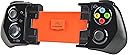

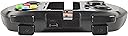
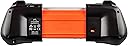
MOGA Ace Power - Electronic Games
Product ID: 1759078
🎮Full console-style controls
🔋1800mAh built-in battery boost
🔒Secure S.M.R.T. Lock tech
Desertcart purchases this item on your behalf and handles shipping, customs, and support to Vietnam.
🎮 Level up your mobile gaming with power, precision, and peace of mind!
The MOGA Ace Power is a portable iOS game controller designed for iPhone 5 series and iPod touch (5th gen) running iOS 7 or later. Featuring a built-in 1800mAh battery to extend gameplay, full console-style controls including dual analog sticks and shoulder buttons, and secure S.M.R.T. Lock technology to keep your device firmly in place, it transforms mobile gaming into a pro-level experience. Lightweight and compact, it’s perfect for gamers seeking extended playtime and precision on the go.
| ASIN | B00H01EXM8 |
| Batteries | 1 Lithium Polymer batteries required. (included) |
| Best Sellers Rank | #840,278 in Toys & Games ( See Top 100 in Toys & Games ) #1,195 in Kids' Handheld Games #9,282 in Kids' Electronics |
| Customer Reviews | 3.7 3.7 out of 5 stars (642) |
| Date First Available | November 29, 2013 |
| Is Discontinued By Manufacturer | No |
| Item Weight | 12.3 ounces |
| Item model number | CPFA130322-01 |
| Manufacturer | PowerA |
| Product Dimensions | 7.95 x 5.42 x 2.65 inches; 12.35 ounces |
| Release date | December 6, 2013 |
| Type of item | Video Game |
A**A
Much cheaper than getting it new, and works just as well.
My older brother Gage got a MOGA Game Controller and the second I used it I knew I needed one. I read about it online and watched many videos, saying it was a gamer's best friend and a gamer necessity, so I was extremely excited to get on. Gage bought his used from a different seller on Ebay and it was great quality and worked perfectly. I couldn't afford a new one with my amazon gift card money, so I bought one used. It shipped extremely fast and I got it within days. It came in the box(ripped and taped, but that's expected with used items) so that was a nice bonus. It came with instructions, the charger(which was great because I saw super nervous it wouldn't come with one), a piece of paper saying thanks for buying my product, please leave a nice review, if anything's wrong please contact me and we can work something out, ect, ect(which is also nice to get because I saw the slip today and reminded me to write a review) and lastly, the controller. When I first got out the controller, I had a mini heart attack because it wouldn't fully open, luckily, it was because there was a lock option on the back that I had to switch off. I'm only saying that so no one makes the same mistake I did. I put the controller on my iphone and began to play a few games with it. It was(and still is) awesome to use. The buttons are a little loose, so I have to push harder on the A,X,B, and Y then the other buttons(which is hardly a problem). But other than that, the controller is perfect. Thank you!!
L**Y
Great concept, but even with updated firmware CONSTANTLY needs to be reset. Don't buy.
This is the best kind of controller for iOS devices because it has two joy sticks. The problem is the device keeps freezing up every 2 or 3 minutes and I have to reset it. I saw other reviews on here saying the same thing, but I thought maybe they just didn't update the firmware so I. Ordered it anyway. Even after updating the firmware the thing still constantly freezes. I'm keeping mine in the hope that a future update may solve this very annoying problem, but if you're thinking about purchasing this now...... DON'T!! It is infuriating being at a very intense part of a game only to have the controller fail and you die/lose progress/whatever for no other reason.
J**E
The best iphone 5 controller
Works great, compatible with a ton of games, the extended layout is nice if you're used to the xbox controller. Very portable, as it was designed. Battery lasts surprisingly long (if you don't use the mBoost). All of the buttons are nice and tactile, the d-pad and the triggers are a little squishy but functional. Analog sticks work excellently. Feels very light and plastic. It does not feel very durable, but in actuality it isn't bad. I dropped it a few times and it survived just fine. When the phone is actually in the controller the weight is much better. The ergonomics could be better, holding it and playing for more than one or two hours starts to get uncomfortable, obviously ergonomics sacrificed for portability but with ios games you're usually not playing for that much longer anyway. As of the time posting this, there are hundreds of compatible games. If you still have an iPhone 5, this controller is probably the best controller for gaming.
A**R
The material does indeed feel like it is not of the best quality
I have an iPhone 5C running Apple's official ios 9.3. I use the controller frequently with both GBA4iOS as well as Retroarch, both of which i compiled myself in XCode. There is no installation or anything necessary, just plugged in my phone and i was able to use it, map controls, etc. The material does indeed feel like it is not of the best quality, but the buttons and sticks are solid and the quality is fine for the current price point around 10$. I also tested it with an iPhone 5s running ios 9.0 and it worked fine as well. If you buy this, do follow the included instructions as it says, and charge the device fully before using it. I couldnt get it to charge my iPhone until i did so, but it has worked perfectly ever since.
G**O
iPhone SE (2016) Users...
Edit: I originally gave this product a bad review, but I’ve done some tinkering with the device and was able to get it to work. Still, there are some annoying issues. Just as some of the other reviews stated, get used to hitting the reset button. I tried using my iPhone SE (2016) with Call of Duty Mobile & Fortnite, and they work for the most part. Unfortunately, connectivity is lost in the middle of gameplay, prompting you to press the reset button on the back of the MOGA device. Also, if you’re utilizing an iPhone SE (2016), the only way this product will work is if you remove both the black & orange adapter. The instructions state that an iPhone 5 requires the black adapter, and even though an iPhone 5 & iPhone SE are the same size, you will have to ignore those instructions. Keep in mind: A brand new MOGA fresh out of the box has the black adapter preinstalled already, so just remove it and connect your phone without any adapters. Charge the device first before doing it. In presentation, it’s a very nice design. I don’t like how it’s exclusively responsive to the micro usb charger that it comes with. So if you have a dedicated charger, you may need to swap it out and hope it doesn’t break. Also: Customer Support # is out of service. Company no longer exists. If you’re spending less than $20 after tax and shopping & handling, it may be worth it.
D**Z
The Moga ace power is a great controller but the reset is a problem
Overall I have to say the controller is so great that it works flawlessly with a lot of great games from Gameloft Glu Mobile Lego games Telltale Games Electronic Arts Rovio deadeffect madfinger games but there are other games that it works but it will become immediately unresponsive I know this is not coming from Moga it is coming from the game developers with very poor controller support implementation now please carefully read my review here is my Pros and Cons about this controller Pros - Overall it works flawlessly it response with pressure sensitivity the dual analog sticks are perfectly responsive the four buttons are pressure sensitive so you have to press a little bit hard in order for it to respond the d-pad is pretty good to the shoulder buttons work flawlessly the triggers work flawlessly even the pause button works flawlessly. Now here comes the cons. Cons - the dpad is pretty clicky and kind of loud so don't use the d-pad at night with somebody near you because they will wake up hearing the clicking so loud the four buttons is too pressure-sensitive you have to press it kind of hard in order for it to respond perfectly the shoulder buttons you also have to press it down kind of hard in order for it to respond perfectly now the last but not least the reset function like many others are experiencing problems with the reset function so here comes the problem I must warn you people DO NOT LEAVE YOUR IPHONE 5 OR IPOD TOUCH 5G CONNECTED TO THE MOGA ACE POWER FOR MORE THAN 1 HOUR OR ELSE THE CONTROLLER WILL TURN OFF PERMANENTLY DUE TO INACTIVITY now if this happens you have to hit the reset button with a paperclip everytime this happens so in order to avoid this DON'T LEAVE YOUR IPHONE 5 OR IPOD TOUCH 5G CONNECTED TO THE MOGA ACE POWER FOR LONG PERIODS OF TIME. Moga needs to sort out this problem like ASAP. In conclusion this controller is so great that its so worth getting its very simple to use and it is a full featured controller just like an Xbox 360 controller trust me you won't be disappointed with this simple controller.
A**R
Great product for the price
this is a great option if you want to turn your iphone 5, 5s, se, or even ipod into a mobile mini console like the PSP. it is a perfect size for my hands, i am 13 years old but it could still be a great size for older or younger people. Pros: buttons are all great and clickable joysticks are completely different from all others i have ever seen but i love them, they are compact and just slide around very small, can fit in the pocket but might look a little wierd in your pocket alot of big name games work with this, including, asphalt 8, modern combat 5, and more works with emulators great price Cons: the shiny black plastic does get scratched up pretty easily but it does not bother me only works for the phones i listed before, no iphone 6`s or 7`s some games that you would expect to work dont overall i think this is a great product and the pros definitely outrule the cons. It would be a great gift for a kid who loves playing games on the go. it makes the all around gaming experience a lot better
D**E
Excellent design... but ultimately unusable.
(For the purposes of this review, not only will be assessing this controller for what it is by itself, but I'll be comparing it to another popular iPhone controller: the Logitech Powershell.) For starters, this controller definitely looks and plays better than the Powershell. The buttons on my product are responsive and work excellently (whereas the Powershell had the annoying issue of buttons getting stuck, to the point where I would regularly need to pry them out with a knife), the D-pad is easy-to-use and doesn't require excess pressure (Logitech had an interesting idea with the Powershell's analog D-pad, but it simply puts too much strain on the user's thumb), and the analog sticks work as expected. The MOGA uses a built-in headphone jack to make playing with headphones easy, whereas the Powershell requires a headphone jack extender, making headphone compatibility clunky as it requires an additional accessory. Overall, this controller is easily superior in design to the Powershell. Unfortunately, the product I received has a particular flaw that drastically affects its rating: charging the device is nearly impossible. The instructions state that charging the controller is supposed to be as simple as plugging it into any Micro-USB cord (a cord is also included with the controller so that buying a separate cord isn't required), plug the cord into an outlet or power source, and the device will begin to recharge. However, after several days of trying multiple cords, fiddling with the positioning of the port in the controller's socket, and using every single outlet available to me, I only ever got the controller to charge one time. I don't know if this is an issue specific to my device, but the impression has already been made. I haven't used this product since March because of this one glaring flaw. I really wanted to give this controller a higher rating, because it's designed SO much better than the Logitech Powershell. But I simply can't give a good rating to a product that doesn't work.
C**N
Excelente dispositivo
El producto es excelente, sin embargo deberás verificar la lista de juegos con los cuales es compatible. Dispositivo ampliamente recomendado para los usuarios de iPhone 5.
E**S
Ottimo
Perfetto arrivato in tempo si prospetta un buon joypad da 100 a 8 euro è un buon investimento ahahahah purtroppo regge solo iPhone 5-5s e compatibili
M**I
Muy bueno con los pocos juegos que funciona
El mando en si es genial, va muy bientanto en iphone 5s como en SE. Funciona en IOS 9.3.3 .Aún hay demasiados pocos juegos que le densoporte, aunque los que funcionan es una delicia, no tiene precio jugar al real racing con mando.
B**N
Very good solid and opens up a new ball game for mobile gaming
This is a cool bit of kit, built in battery, sleek design, smooth buttons and controls, cannot fault this. Comes with USB charge cable and adapters for iPhone 5, 5S, 5SE and 5C. It opens up a different world of iPhone gaming, especially with racing games and FPS, excellent value for money although is a bit bulky when all together not for pockets :) The only issue I have with this if you can call it one is the internal battery needs charge to be able to use it, I don't see why you cannot use it without battery charged and use the iPhone instead?
A**R
we are very pleased that you did
we got the replacement that you people sent , thank you ...you stood behind your warranty , we are very pleased that you did ..thank you ..it works great . again thanks
Trustpilot
2 weeks ago
5 days ago