Buy anything from 5,000+ international stores. One checkout price. No surprise fees. Join 2M+ shoppers on Desertcart.
Desertcart purchases this item on your behalf and handles shipping, customs, and support to Vietnam.
📄 Scan Smart, Work Smart!
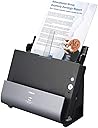
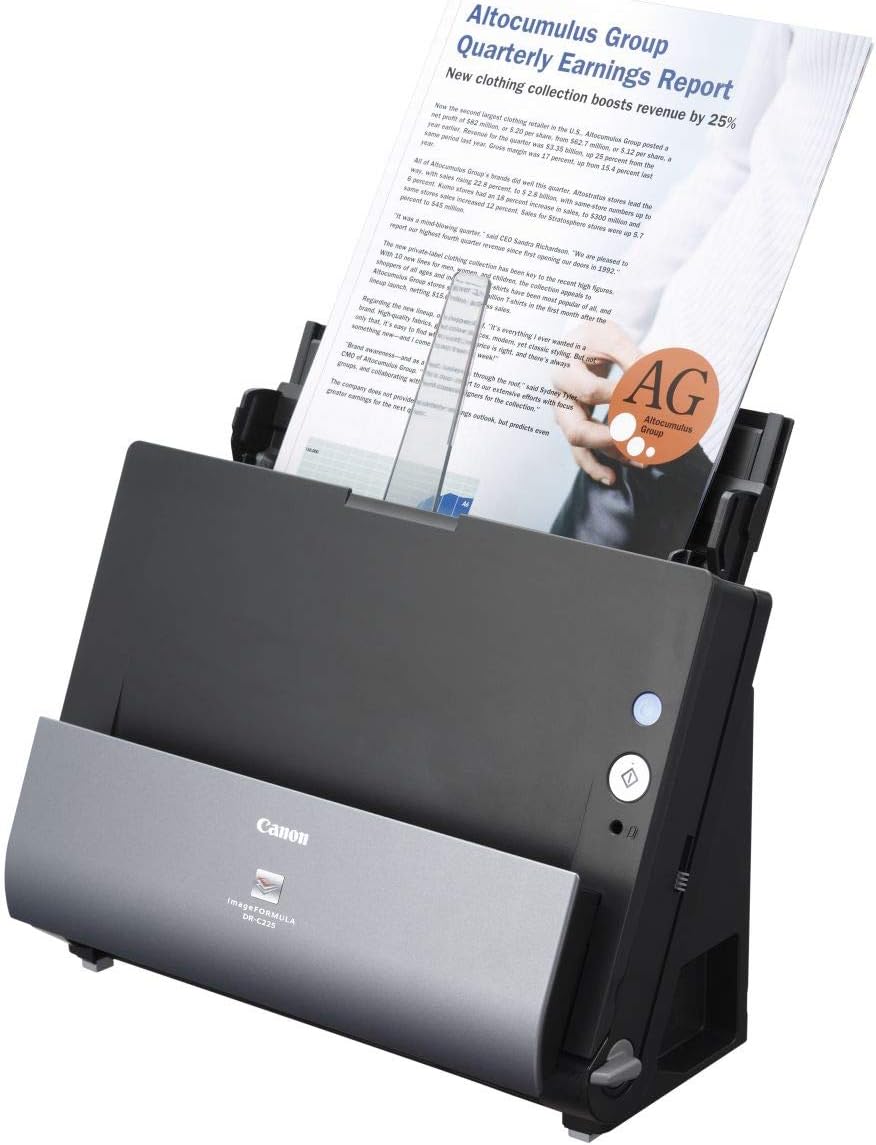
The Canon imageFORMULA DR-C225 is a compact and efficient document scanner designed for home and small office use. With a space-saving upright design, it offers high-quality scanning at 600 bpp resolution, automatic settings adjustment, and the ability to handle mixed document types effortlessly. Its low power consumption and user-friendly features make it an ideal choice for professionals looking to enhance their productivity.


| ASIN | B00LBVUIV8 |
| Best Sellers Rank | #390,370 in Office Products ( See Top 100 in Office Products ) #439 in Document Scanners |
| Brand | Canon |
| Color Depth | 600 bpp |
| Connection Type | USB |
| Connectivity Technology | USB |
| Customer Reviews | 4.4 out of 5 stars 277 Reviews |
| Global Trade Identification Number | 00013803248753 |
| Item Dimensions D x W x H | 6.1"D x 11.8"W x 8.7"H |
| Item Weight | 16 ounces |
| Light Source Type | LED |
| Manufacturer | Canon USA ( Scanners) |
| Media Type | Paper |
| Minimum System Requirements | Windows, Mac |
| Model Name | imageFORMULA DR-C225 |
| Optical Sensor Technology | CCD |
| Product Dimensions | 6.1"D x 11.8"W x 8.7"H |
| Resolution | 600 |
| Scanner Type | Document |
| Standard Sheet Capacity | 50 |
| UPC | 013803248753 |
| Unit Count | 1.0 Count |
| Warranty Description | One year advanced exchange |
| Wattage | 12.8 watts |
C**N
Great scanner
Great hardware. I have scanned folded and crumpled letter and legal size documents, as well as various sizes of paper and cards like driver license and business cards. All scanned well and quickly with few jams. Software is good. I already had Paperport 14, so I skipped that. Canon's Capture on Touch is pretty good, once you figure it out and set up the profiles you want. You can set it up to create a separate pdf for each page or all pages into one pdf file, color, B&W, greyscale or automatic. I found that using B&W on a crumpled carbon copy on pink paper removed the color and the wrinkles. Very pleased with the scanner and software. Drivers are an issue. I installed it on Windows 7. When I upgraded to Windows 10 the computer could not find the scanner. I emailed customer support and got a reply in a couple of hours (on a Sunday!) that there was no Win10 driver yet; as a current product it would probably get one, but no ETA available. So kudos for a prompt response, a Bronx cheer for its content. I resolved my driver issue by using a NextBook that is running Windows 8.1. Driver and Capture on Touch work fine, and I set up the profiles to save to a folder on OneDrive. Then I go to the Win10 computer and move the file to other folders on that computer. It works, but I am looking forward to the Win10 driver. Another reviewer indicates that Canon expects to release the driver in 2 - 3 weeks. When the Win10 driver is released, and I determine that it works property, I think I will increase my rating to 5 stars. I am debating whether or not to knock off a star for what appears to be an habitual delay in developing drivers for new operating systems that other manufacturers do not seem to encounter. Googling revealed a similar delay in delivering drivers when Windows 8 came out. UPDATE 8/29/15: Windows 10 driver and software are out. I haven't tried them because I dropped back to Windows 7. There were just too many articles about Windows 10 phoning home with all kinds of information for me to feel comfortable. So I have given it 5 stars because it is a great scanner.
R**6
Great Hardware AND Software
I'm using this to digitize my life -- tax returns since the 1980s, rental property info, financial records, etc.! It installed easily -- I'm using Windows 10 and I was operational within about an hour. I've done about 10,000 pages with very few problems -- staples, crumpled paper and the like -- all things I should have fixed before I did the scanning. The software is great -- I scan to PDF files stored on my desktop, then rename and migrate them to permanent storage -- I'm saving multiple copies -- online, cloud and USB drives! Already have more than 4 GB of data! While I'm scanning, I've found that the software presents it correctly but when opening the PDF files later using Adobe Acrobat, I sometimes have to rotate the view - no big deal. Another thing I like about the software is that it senses whether there's anything on the back of a page and scans/doesn't scan as appropriate -- GREAT! I like this so much, I'm thinking about buying another to keep in case this one ever breaks down! I know that there's a version that's Internet enabled, but I'm comfortable with the USB 2.0 connection. I thought that it might be a bit slow and that a USB 3.0 connection might be better, but it's very fast -- it's rated at 20 ppm, and it does that -- front and back simultaneously.
J**Y
This is an awesome scanner. I haven't used the Fujitsu scansnap ix500 ...
This is an awesome scanner. I haven't used the Fujitsu scansnap ix500 which is (apparently) this scanner's closest rival. However, I went with the Canon because I wanted a smaller footprint for the desk in our kitchen. I'm planning on going paperless with this scanner for all our mail / documents. The only reason I didn't give it 5 stars is because it doesn't have wifi or bluetooth. I don't love having to have it plugged in via USB, but it is worth the smaller footprint and vertical U feature that spits the paper back up vertically so that you don't have to worry about how the paper will spit out in front. It's nice though that you can adjust it to spit out the front if you have a thicker document or business card, notecard, etc. I plan to scan mostly to PDF and the file sizes, text quality, and OCR recognition at the default levels is really good. I didn't even need to adjust the defaults until I wanted to scan our property tax receipt which is a weird multi-page stuck (glued) together but not full size sheet. The software kept telling me that it detected a double feed scan and it would abort (even though I adjusted the U turn thing to feed straight through and the switch on the right side was up, so the indicator showed orange which is supposed to not separate the pages when feeding). It took some fiddling to figure out but all I needed to do was add another shortcut that had the advanced settings enabled with 'Double Feed Detection' disabled. All and all I'm very happy with the speed and quality that this scanner provides.
T**H
I mainly use it to save documents like bills and paystubs
I have had this a few weeks now and have scanned at least 200 pages. I mainly use it to save documents like bills and paystubs. I have fed some odd shaped things and stuff I mail to utility company with checks stapled to it and as long as you feed the attached part in first, it scans beautifully. The speed this processes pages through is impressive, a stack of like 35 pages is done in way less than a minute. ( I didn't actually time it so sue me) The software included allows you to make shortcuts from the computer desktop as to how the file is scanned: picture, black and white or automatically detect the type. You can also send the scanned file to any destination including DropBox, Evernote, Google Drive, Sugar Sync or just to a folder on your drive. Output is also in :PDF,TIFF,JPEG or PNG quality is good and it takes up little desk space. There is an option for 2 different outputs of the scanned paper documents, either curled up the front of the unit or laid out flat in front on the desktop. All the feed rollers are removable for cleaning and it opens up real nice to clean dust and maybe jammed pages. This almost makes scanning large amounts of documents fun. I am using this on a Mac and am kinda used to getting gyped on included software and features but this seems to have equal versions of everything I have looked for so far. I am sure I have missed something and will stumble on it later but it does everything I am looking for in a scanner
D**M
... used this machine for almost 10 years and I love it. The only reason I had to buy ...
I have used this machine for almost 10 years and I love it. The only reason I had to buy a new one is becuase I finally convinced my boss at my current job to get it. It is a workhorse. I used it daily at my last job and scanned nearly every document that crossed my desk. I managed HR and accounting so that means lots of paper. Aside from the occassional jams, which were always easy to clear, it never gave me any trouble. It didn't need serviced or repaired. It just worked and did a quality scanning job. I loved it so much I bought one for my home and have used that one for years, but not as heavy use, of course. The hardware is great, the set up was easy. I can't speak to the software that comes with it. We had a third-party e-filing system at work that it worked great with, Intact by InfoDynamics. At home I just used it with my existing folder structure. I am just now exploring how to use PaperPort, the included software, as we don't already have software at my current place of employment.
P**Y
or smaller file sizes (there are like 5 settings)
It is fast, works well with both PC and Mac via USB. Put the papers in, press the button, and a few seconds later, up pops the preview window which allows you to do quick edits (like page rotation), and then save to PDF. You can choose the PDF quality for either very detailed scans, or smaller file sizes (there are like 5 settings). The software does a guess as to whether or not it is single or double sided - easy to delete pages if it guessed wrong (which it rarely does). Works equally well for PC and Mac (I bought two for our set up). Haven't had a paper jam yet either. Auto turns off for inactivity, but it turns on quickly and then immediately works with the computer.
L**Y
A scanner is not a file retention system
This is a workable solution for home scanning of documents. Software is decent, and the scanner gets most of the documents through, and does allow for correcting of the ones that don't. Software adjustments are trial and error, error, error. Techie alert! One must create a system of file retention yourself. This does little to help, and NO guidance on how to do that, nor where to go to find guidance. Update 7-2020. Canon chose not to update the software to work on Caralina. So it killed the machine saying their policy was not to support 64 bit. But they are still selling it as Mac compatible. And now the major mac release fo OS 11, Big Sur is coming out. The problem with buying this is you do not know when they will obsolete the device and leave you hanging. Getting your spouse to join in on the scanning system is beyond the the scope of this review.
A**R
Pretty good scanner, bad software, documentation, and a few other things.
I've been mostly happy with the quality of the scans and that it does both sides at the same time. Things I'm not happy about: 1. The scanning software, while diverse with integration of other products (pro), seems to have been written by a very junior level developer. They clearly don't know how to write Windows apps in terms of understandable dialog/settings, readability of the app, or that Windows can have different screen resolutions. The size of the app is tiny on my laptop with a resolution of 3000x2000 on my Surface Book, the settings dialog for options for each integration application remains tiny, no shortcut keys, and lack of standard Windows dialogs (no X to close, can't resize, can't move it off the main app). For the cost of the scanner, I would expect the software been developed using appropriate standard and by someone with more development experience than a 10 year old. 2. Documentation was clearly an afterthought. Probably written by the person who was out sick when assignments were made and wasn't happy when he/she found out they had to write it. Not all the controls are documented, no troubleshooting, and while they talk about straight feeds, it doesn't say how to set it up. 3. While it says 30 sheets can be loaded to the feeder, this often causes two problems: the scanned doc tray fills out unorganize and can cause the scanning to be blocked; and the extensions for the feeder aren't long enough if you have all 30 sheets of paper of standard or legal size. These are the little things that make this printer a little challenging. See the attached photo for one of the key dialogs.
D**C
Using multples at workstations at our business
Generally no fuss dependable scanners, occasionally have had jamming issues, but overall happy with this scanner and would recommend for fairly heavy use.
P**H
Good scanner if you have the patience to drop the papers one after the other.
The scanner is capable of scanning page after page and cannot handle a bunch of papers at once, as it get stucks. Very efficient scanner if scanned manually by dropping one page after the other .
L**O
Custo benefício excelente
Preço bom, produto excelente.
R**Z
Impresionante velocidad y reconocimiento de texto
Seleccioné este producto después de investigar los mejores scanners automáticos en revistas especializadas. Entre ellos está el Canon DR-C225, y la verdad estoy muy satisfecho. Su velocidad de escaneo en la vida real es de más de 20 páginas por minuto, por ambas caras de la hoja y a color. La calidad OCR es muy buena, reconoce muy bien el texto. Lo recomiendo ampliamente. Hay que considerar que papeles pequeños y delgados, como por ejemplo un ticket de compra, es posible no puedan ser debidamente sujetados por los rodillos giratorios del scanner..Para estos casos, es mejor un scanner de cama plana (flatbed) tradicional.
B**S
it was great at scanning stacks of papers
After 800 pages on the first day, the feed wheels wrecked. Up to that point, it was great at scanning stacks of papers, double-sided and using the OCR to translate to text. The other option is the Fujitsu ScanSnap iX500 which has the same options and speed and equally rated.
Trustpilot
1 day ago
2 weeks ago