


Desertcart purchases this item on your behalf and handles shipping, customs, and support to Vietnam.
๐ See More, Miss Less โ The Future of Surveillance is Here!
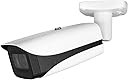
The EmpireTech Smart 2MP Bullet IP Camera combines a high-definition 1/2.8" CMOS sensor with ultra low light Starlight technology and a powerful 12x motorized zoom lens. Designed for both indoor and outdoor wired setups, it supports PoE/ePoE for easy installation and features smart AI motion alerts with built-in microphone. With night vision up to 150 meters and 1080p resolution at 30fps, itโs engineered for professional-grade surveillance that never sleeps.


| ASIN | B07RJQT9NB |
| Alert Type | Motion Only |
| Antenna Location | Outdoor indoor |
| Battery Power | 200 |
| Best Sellers Rank | #697 in Bullet Surveillance Cameras |
| Brand | Loryta |
| Built-In Media | As detailed |
| Color | White |
| Compatible Devices | As detailed |
| Connectivity Protocol | Ethernet |
| Connectivity Technology | Wired |
| Control Method | App |
| Controller Type | As detailed |
| Customer Reviews | 4.5 out of 5 stars 59 Reviews |
| Effective Video Resolution | 1080 pixels |
| Enclosure Material | Metal |
| Flash Memory Type | Micro SD |
| Focus Type | Manual Focus |
| Form Factor | Bullet |
| Frame Rate | 30 fps |
| Indoor Outdoor Usage | Indoor, Outdoor |
| Indoor/Outdoor Usage | Indoor, Outdoor |
| Installation Type | Screw In |
| Item Dimensions | 10.76 x 3.74 x 3.74 inches |
| Item Weight | 3 pounds |
| Light Source | LED |
| Manufacturer | China |
| Manufacturer Warranty Description | 2 years warranty |
| Memory Storage Capacity | 256 GB |
| Mfr Part Number | IPC-B54IR-Z12E S2 |
| Model Name | Loryta Camera Smart 2MP |
| Model Number | IPC-B52IR-Z12E |
| Mount Type | Wall Mount |
| Night Vision | Starlight |
| Night Vision Range | 120 feet |
| Number of Channels | 2 |
| Number of Items | 1 |
| Optical Zoom | 12 x |
| Other Special Features of the Product | Night Vision |
| Photo Sensor Resolution | 2 mp |
| Photo Sensor Technology | CMOS |
| Power Source | Corded Electric |
| Recommended Uses For Product | Outdoor indoor |
| Room Type | Bedroom, Kitchen, Living Room, Nursery, Office |
| Special Feature | Night Vision |
| Specific Uses For Product | Surveillance |
| UPC | 739210402600 |
| Unit Count | 1 Count |
| Video Capture Format | MPEG H, MPEG-4 |
| Video Capture Resolution | 1080p |
| Viewing Angle | 53 degrees |
| Voltage | 12 volts |
| Water Resistance Level | Not Water Resistant |
| Waterproof Rating | IP67 |
| Wattage | 2.5 watts |
| Wireless Technology | Wired |
| Zoom Type | Optical Zoom |
K**D
Best long distance camera yet for PoE users
Using as a camera for a mailbox 300 ft from house. The strong zoom works great -- note this is intended as a "set and forget" zoom, not a "zoom in and out routinely" zoom. Has near and far IR illuminators, though they're really only useful at min aperture for license plates. Best to leave the iris open and minimize the IR as they haze the night picture badly. Only complaint is that one time, I woke up and the camera was spontaneously out of focus. Rebooted and it refocused fine. Not sure what happened, but I can tolerate a glitch once in almost a year of use. Great GREAT night vision -- with a dim street light, I'm getting full color at night without the need for IR, and that's even with a decent shutter speed.
R**H
Works great for getting license plates and got it to work on my reolink nvr
Excellent for capturing license plates and a great security camera in general. If you have it set for license plates don't expect to see anything else with it at night aside from that, that is normal because the settings for license plates make the plate stick out and everything else around it dark. Followed some help in previous reviews shutter speed 1/000 or 1/2000 etc. Got it to work on my reolink nvr via a poe hub on the same network as the nvr, next I will try to get it to work directly on the nvr poe port. Getting plates in the day and night, have it mounted on my fence post on side of my home about 60 feet from center of the road. I will add that the day night feature does ruin the focus so I leave it on black and white aka night mode so that it does not switch at all. I wonder if they will release a firmware update or instruction to prevent this. But for now this is good enough anyways.
D**D
Follow the setup advice from other reviews and works excellent for LPR
Read the "most helpful" reviews here for setup and settings advice and this works great as an LPR camera, day or night, even with little illumination, for vehicles traveling ~15mph (turning onto our private road). Couple of things I didn't see mentioned elsewhere: * Don't forget to set the "daylight savings time" parameters in Settings otherwise your timestamps will be off by an hour * The UI for retrieving clips is cumbersome, as most recent clips are presented last, and the format is dav, which I was not familiar with but I guess is standard for security cameras * Recommend combining it with a few python scripts (ask your favorite AI) to extract jpg frames from dav files and use a "voting mechanism" to extract the most likely license plate, should you need it to be automated in some way.
U**2
Good for the cost
Nice quality camera with good features and well built. Overall a great value for only $249. If you're on a budget, I highly recommend this camera. The 64mm zoom is amazing. That said, if you can afford $650, and want built-in LPR analytics, get a Hikvision LPR specifically designed to capture plates. Also, LPR's are not plug & play cameras. They require camera knowledge and A LOT of trial and error to zero in tags. Getting good quality images and video for day and night was a challenge. Some images are not great but that's due to lighting conditions, shadows, plate location, plate illumination, speed of vehicle, etc.. But I should be able to identify about 90% of tags. I wish this camera had specific LPR/ANPR software build-in. Such as lists of tags and tag search.
I**E
Great LPR Camera - IF conditions/settings are met
So first off, EmpireTech-Andy is one of the few sellers I trust to order cameras like this repeatedly from, I've never had an issue and I've ordered in the hundreds by now, as well as NVRs. He's quick to answer questions and get back on things that need research, not something you find very often with 3rd party sellers. Onto the camera - Using this for LPR (License plate recognition) is not going to be an install it and forget it situation. The first step before even ordering the camera is understanding the environment you intend to use it in. The angle from the camera to the area where the license plates will be presented, surrounding lighting and height of installation matter, as well as speed of the vehicles. In terms of installation height and angle, the lower to the ground the better - If you got it mounted 30ft up in the air pointing down, you're going to have a bad time. This is why you see in parking garages these are usually only a few feet off the ground and almost directly in front/behind the vehicles. Same thing with the angle, you want to try to be as straight on as possible, if you're coming at a 90 degree angle - You're going to have a bad time. Lighting - While a well lit area isn't 100% required, it does make capture must easier if your other conditions aren't great. If it is pitch black out with zero lighting and your camera isn't setup in an ideal spot with angle,distance and height - it's going to be a bad time. Camera settings - So here is where we get into the fun stuff and it does require some end user adjustment depending on your area. The biggest two things you need to do - Zoom that in until the license plate enters the screen and covers at least half the frame - We need as many pixels as we can. The second aspect to this, shutter speed. 1/30th is just not going to cut it, unless the vehicles are slow moving and you got it lit up like July 4th. We can find shutter speed under the exposure tab in the settings. I suggest starting at 1/1000 shutter speed (you'll have to change Mode: to manual) and possibly going to 1/2000. What this will give you is a VERY dark scene, even if you have some lights around. This is normal and usually when a plate enters the scene, it'll practically glow in the dark. We can start with these settings and sometimes, you get lucky and not have to touch the others. If these still aren't cutting it then we'll need to dip into things like HLC/BLC and brightness, etc. These tend to occur more if you have sub-par lighting and are trying to increase that, or if you're running into lots of glare/washout from headlights. Long story short - these are great cameras when used in the right circumstance, and even in the wrong one, they can be adjusted accordingly. Set your expectations accordingly - You aren't going to capture plates AND get a good surround view of the area both day and night.
B**A
For LPR recommend
This are amazing for the price! It was difficult to set up but finally got it to where it captures the majority of car plates day and night i have it high enough to not be messed with and zoomed in where it captures a good enough image i have modified night vistion to where it stays in that mode all the time mounting was the easiest part and motion detection works great and good storage it over records i recommend to get 512gb to have as much saved possible if ever need an older date to look for. I have another camera that records the same direction to get color of vehicle and a bigger view.
R**R
Great for LPC - If You Set It Up Correctly
Cam is great for LPC, but requires a big amount of engineering to get it up and running correctly. Unless you have super optimal placement, LPC is not a plug and play exercise. If you have the time and ability, you get a lot of capability for the price. If you don't, see the one star reviews. Not everyone will able to set it up for LPC, it takes a decent amount of fiddling and technical knowhow. I found that my settings were substantially different than others. First, placement makes a very big difference. Required shutter speed is an easy calculation from known vehicle speed vs license plate letter size, but other adjustments (such as exposure, gain, backlight treatment, etc) are more subtle and won't carry over from one person to the next. I dialed these in using a couple plates (one dirty, one clean) on a stand where I planned to capture plates in practice. Finally, when mine is set to capture plates, in night mode, it can't see the background sufficient to auto-focus. Focus settings for night mode are different from day mode, leading to blurry images. Also, for LPC it waits longer than I'd like for the changeover. I have seen two solutions which appear to work for the focus issue: (1) utilize a day/night utility (for an example, search for dahua day/night utility, download at your own risk) that commands focus and other settings at the changeover, and (2) setting a reflective target where it can see it and therefore focus even with the LPC settings. Mine has worked flawlessly with (1) for over a year now. Finally, I've bough quite a few cams from Andy, and his communication has been awesome.
J**O
Good pictures day and night but has a time bug.
Works great with great pictures but reverts to default time zone and is off by one hour which for some reason affects the motion detection. Tried leaving the time zone alone and syncing to PC time which lessens the problem but doesn't cure it. Fix is to set reboot schedule to daily. Contacted Empire Tech and got firmware patch - testing it now
Trustpilot
3 weeks ago
1 month ago