Buy anything from 5,000+ international stores. One checkout price. No surprise fees. Join 2M+ shoppers on Desertcart.
Desertcart purchases this item on your behalf and handles shipping, customs, and support to Vietnam.
🎙️ Elevate Your Conference Game!
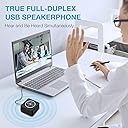
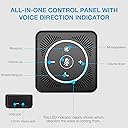
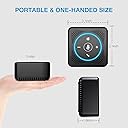
The EMEET USB Speakerphone M0 is a cutting-edge conference call solution featuring 4 AI microphones for 360° voice pickup, true full-duplex communication, and a compact design. With plug-and-play functionality and an AUX port for private calls, it's the ideal choice for professionals seeking seamless connectivity and superior audio quality.


| ASIN | B07Q3D7F8S |
| Additional Features | USB Port |
| Antenna Location | For Computers |
| Best Sellers Rank | #1,121 in Office Products ( See Top 100 in Office Products ) #1 in Telephone Audio Conferencing Products |
| Brand | EMEET |
| Built-In Media | conference speaker |
| Color | Black |
| Compatible Devices | Personal Computer |
| Connectivity Protocol | USB |
| Connectivity Technology | USB |
| Control Method | Remote |
| Controller Type | App Control, Button, Voice Control |
| Customer Package Type | standard packaging |
| Customer Reviews | 4.3 4.3 out of 5 stars (2,070) |
| Enclosure Material | Plastic |
| Frequency Response | 20 KHz |
| Impedance | 2200 Ohms |
| Is Waterproof | FALSE |
| Item Weight | 7.36 ounces |
| Manufacturer | Shenzhen EMEET technology Co.,Ltd. |
| Model Name | OfficeCore M0 |
| Model Number | OfficeCore M0 |
| Mounting Type | Tabletop Mount |
| Number of Audio Channels | 3.1 |
| Number of Items | 1 |
| Power Source | Corded Electric |
| Signal-to-Noise Ratio | 78 dB |
| Speaker Size | 3.1 Inches |
| Speaker Type | Computer |
| Specific Uses For Product | For Computers, Conference Calls, Small Meetings |
| UPC | 712317242447 |
| Unit Count | 1.0 Count |
| Warranty Description | 2 YEARS WARRANTY |
| Warranty Type | Limited |
| Water Resistance Level | Not Water Resistant |
| Wireless Technology | Bluetooth |
L**.
Excellent microphone and speaker
I've been using this for a week or so now with Microsoft Teams meetings, and it works great. Sound quality is good on both microphone and speaker. Setup was easy, and the on device controls (mute, volume controls) work great with Teams on Windows 11. I would definitely recommend this as a solid speakerphone. In terms of lights on the device: - The speaker phone has a nice feature where if you are muted in a call, the LED light "circle" on the device glows red. Very helpful with knowing if you are muted or not. - By default, the speakerphone has a feature called "DOA" in which the light on the device glows blue to indicate the direction of who is speaking. This is on all the time - even when you are not actively using the speakerphone in a call. So this means at all times, there is constantly a blue light that comes on and off periodically if there is noise in the room. This was kinda annoying, but I found it can be easily disabled. Just go to the EMEET website and download the EMEETLINK application, and from there you can permanently disable this feature. Once done, the device no longer lights up anymore unless you are actively using the microphone or speaker.
J**.
Great conference phone solution
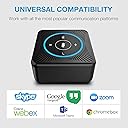
I bought this product to use for conference calls in my office at work where multiple attendees can participate and contribute to the discussion. Very easy to set up and install. The sound quality is excellent and clear and the mute and volume controls all being centrally located on the top of the unit make it easy to adjust or mute. Resolved a multitude of issues for me. Would highly recommend for anyone needing a cost - effective, high quality conference phone solution. Works seamlessly with MS Teams, Cisco Webex, Avaya Equinox, Avaya Spaces, Zoom in my personal experience. The convenient USB connectivity provides reliable audio stream with no battery charge required.
N**Y
I'm buying 2 more.. that's how much I like it.
I have an old Dell laptop that works really well, but I did drop it at least a couple of times over the years and I don't know if that's what screwed up the microphone. I tried Zoom and Facebook Messenger and Rooms, but the laptop microphone doesn't work, the audience hears only a couple of scratches when I talk.. so I looked for a good and affordable speakerphone and found the eMeet M0 for $69.99. I was so annoyed at first because the directions included are not clear and concise.. nowhere does it say that I have to go into Control Panel and disable all other microphones/speakers and manually click default for this item when plugged in... one would naturally assume that all you had to do was attach it to the usb of your computer and it would work itself out... Not. However, it only takes a few clicks every time you put it on and once u get the hang of it, the speakerphone does a good job. Everyone in my Zoom and other online meetups say the sound quality of my voice is great with this speakerphone and I can hear them loudly and clearly with nice tones, not the cheap thinned ting electronic sounds (think bose sound vs transister radio). My husband likes it so much that he took mine! We're all Sheltering at Home for this pandemic, so now uses it for business. He said he'll get me another one, but they don't deliver as quick during these days. I think this eMeet M0 is a good product for its price. We'll be ordering more.
A**.
Great product
I'm a technical Support engineer spending my time in virtual meetings or helping my Field Support colleagues on the "phone". I do not like to wear headset all day long as it hurts my ears with the physical contact of the headset to my ears but also with the direct sound to my ears. I have been using a separate microphone and speaker attached to my laptop but people complained of terrible echoes and I had to mute myself as soon as I finish talking. I researched for a solution to cancel the echo and I learnt that the only way to cancel the echo is if the speaker and the microphone are linked to the same sound processing system. So that it can figure out what comes from the speaker and prevents that sound from going back into the microphone. So, it has to be an all in one system. I picked this model because it is a USB model so that I don't have to worry about battery life. The microphones work great. The electronic circuitry totally remove any echo coming from the speaker. The speaker is loud and clear at the expense of being a little harsh sounding.
J**C
Great little Speakerphone
I bought this Emeet in June of 2022 and it's now Feb of 2023 and the Emeet is still working great. My laptop has a horrible broken speaker and since it's a company device I don't have any option for repair. I'd been using a headset for meetings and calls as we worked from home and I was getting really tired of having to wear my headset all day. I looked into getting a decent affordable speakerphone and this popped up. The reviews seemed ok so I took a chance. The speaker came very well packaged and there was nothing to setting it up, I didn't need to install any software (as this is a work computer I don't have the option to install software anyway). I plugged it in, Windows instantly recognized it and I was ready to go! The controls are super easy and I love the fact the whole ring on the top of the device lights up red when I have it muted. It's a nice quick visual to see I'm safe to talk and not be heard in the meeting I'm in. The speaker has good sound, it won't win any awards but it's miles better than the internal speaker on my old laptop. I was so happy with the device I bought a few more to give to my co-workers! They all liked it too! I'm incredibly happy with my purchase and I'd definitely buy it again!
A**R
After waiting for 3 weeks I finally received a product, but it was defective! Looks like it was not tested at all. I am writing this review just after sending the return request. After receiving the item I tried using it for Teams, skype and zoom calls, the sound quality is good from both the sides, but the PROBLEM is it disconnects with the system during the call and I can't hear the sound from other side. It consistently happened for all the calls. Then I tested it for youtube videos it’s the same problem! after 3-4 min of video it disconnects and I can't hear the sound. Didn't expect such a bad quality for the price and brand. I returned it.
A**E
This E-meet speaker and built in microphone is compact and very useful for my online meetings. I recently purchased it and very pleased with it. It works well and the sound quality is good. I can hear clearly and people on the other line can hear me clearly. I can also plug in my ear buds to it if I don't want everyone in the open office hear my conversation. It's small enough that I can put it in my sticky note cube tray and it's partially hidden so people can't steal it so easily. I like the colours when it's on. Light blue for lower volume and dark blue for full volume. It's easy to just plug into my computer hard drive at work and play. Down side is, I couldn't answer my calls by just pressing the phone icon on the speaker. I have to click on my computer to o answer calls on TEAMS. I called our work IT department and the tech said the speaker does not support TEAMS, which is an online meeting program. I can still use it for meetings but have to manually click on the answer icon on my computer first. I am still pleased with my purchase and happy I can hear and speak with one speaker just by clicking on a button instead of trying to pull out my ear buds from my drawer to plug into my computer when people are calling me on Teams.
J**E
Great little speaker, doesn't take up much space and the sound is clear.

W**N
It's easy to use and the sound is very clear. Work really well for me.
R**4
I’ve had it for almost a week and so far it’s working great. Speaker is very clear on Teams meeting and didn’t notice any interference from background noise. Easy to use and plug and play. No need to download drivers. Voices come out crystal clear & definitely a good price if you get it at a discounted price ($49). Only thing that annoys me is that when device is plugged in and not in use, a blue light glows on and off when it picks up sounds in the background or you are talking. I contacted Emeet & no way to turn off and they told me to hit the big button in the middle to mute mic but it just continuously glows red .
Trustpilot
2 months ago
1 month ago