


🎨 Unlock your creative edge anytime, anywhere with Wacom’s sleek digital canvas!
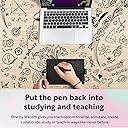
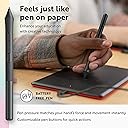
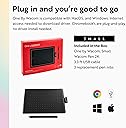
The One by Wacom Small Graphics Drawing Tablet offers a 5.98" x 3.74" active area with 2048 pressure sensitivity levels, delivering a natural pen-to-paper feel. Compatible with Chromebook, Mac, and Windows via USB-A plug-and-play, it requires no driver installation. Lightweight and portable, it includes a battery-free pen and free software trials plus training, making it ideal for students and creators seeking professional-grade digital drawing technology.




| ASIN | B07S1RR3FR |
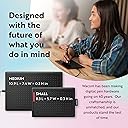
| Active Surface Area | 5.98" x 3.74" |
| Additional Features | Plug-and-play with Chromebook |
| Best Sellers Rank | #137 in Computer Graphics Tablets |
| Brand | Wacom |
| Built-In Media | Digital Pen, USB Cable |
| Color | Black & Red |
| Compatible Devices | Chrome, Mac, PC |
| Connectivity Technology | USB-A |
| Customer Reviews | 4.5 out of 5 stars 7,337 Reviews |
| Display Type | LED |
| External Testing Certification | Não aplicável |
| Global Trade Identification Number | 00753218985835 |
| Item Dimensions L x W | 5.7"L x 8.3"W |
| Item Type Name | Graphics Tablet |
| Item Weight | 440 Grams |
| Manufacturer | Wacom Technology Corporation |
| Mfr Part Number | CTL472K1A |
| Model Name | One by |
| Model Number | CTL472K1A |
| Native Resolution | 1920x1080 |
| Operating System | OS X 10.10 Yosemite, Windows 10, Windows 7, Windows 8.1 |
| Pressure Sensitivity | 2048 Levels |
| Special Feature | Plug-and-play with Chromebook |
| Specific Uses For Product | Drawing |
| Target Audience | Student, Teacher |
| UPC | 753218985835 |
| Unit Count | 1.0 Count |
| Warranty Description | 1 year manufacturer |
S**L
Is perfectly compatible with my MacBook, and works GREAT with ZBrush
I don't understand the bad reviews...this is the FIRST Wacom product I've ever bought that was truly plug and play. I'm on a MacBook Pro with USB-C, and shockingly, once I connected it with a USB-A to USB-C adapter (I used the Apple branded one), it automatically started working. I own about ten of the Intuos pads that I use for teaching ZBrush, and several other Wacom tablets (24" Cintiq Pro, 16" Cintiq, and Movink), and I've had issues with compatibility and drivers. This works amazingly well. It's nice and small, and an improvement over my Intuos pads. I even recently added the Bluetooth Intuos, and it's terrible and laggy. For $40, I'll probably replace all of my Intuos tablets for teaching. I recommend this one.
R**.
Great Tablet for Osu!
These pros and cons are coming from someone who only uses this tablet for playing Osu: Pros: -Simple, quick, and easy to setup -Noticeably better than cheaper tablets, like the XP-pen Star G640 (less jittery cursor movement, less weird glitches) -Can set exact tablet area from the software -Pen is lightweight, battery-less -The quality of the tablet durable -When I switched from cheaper tablets to this one, I actually improved a little and had better accuracy and control in game -Worth the money, as this is still a relatively cheap tablet Cons: -The micro USB cable is a little short, it couldn't reach my PC (luckily my keyboard has a USB port) -The USB port on the tablet is on the left side, making it hard to put the tablet close/next to my keyboard because of the cable -The buttons on my pen rattle slightly when I shake the pen (this isn't really a problem, just a nit pick)
K**R
Honestly the best tablet for osu! right now.
Ok, getting the title out the way, I bought this tablet for osu!, a rhythm game where you aim your cursor and click the notes to the music, this review probably won't help you if you're looking at this for art purposes. Starting with the surface, the tablet is very rough and paper-like on the surface, but wears down and becomes smooth after about an hour of playing (dragging) on a select area. Yet, I can't say the same for the pen nib, the pen nib is very smooth and takes about a day to 2 days to wear down to the friction you drag, note this only applies to dragging players however. The Wacom drivers are okay, but they have a small bit of hardware smoothing and have limited settings on adjusting tablet area as the drivers were made for artists, so know to download opentabletdriver if you would like less delay and a better experience for osu! For the pen itself, I do have a few criticisms about it that knock this tablet down a bit in my own personal ratings. First is the buttons, now yes, even though this pen was made for people to draw and use the buttons for commands, the buttons get in the way with any way I try to grip the pen at the bottom, including when I actually want to draw something with the tablet. Second is the grip, the pen is very slippery and has a smooth finish on the texture, so it always slips out my hands when I get sweaty or even when I don't get sweaty. I had to apply tennis overgrip to the pen to solve this problem so yeah it is a pretty big issue. Yet, circling back to the tablet, it is a good tablet overall, and compared to the CTL/CTH 480 which is discontinued and costs hundreds to get from Japan, this tablet costs only 40 dollars, has a 133hz refresh rate, and is available anywhere you can go on amazon. In general, I recommend this tablet for osu!, and you should buy it. If it's good enough for the number 1 player, why wouldn't it be good enough for you!
B**1
Perfect for Osu
Got this tablet for Osu since it was recommended by nearly everyone due to its price and no lag input/delay. I also decided to use open tablet driver over the wacom drivers since the wacom drivers apparently have bloat and can add latency. Only thing I could dock off a star is the pen since it is pretty thin (I will probably end up purchasing a second hand CTH/CTL 480 just for the pen since it is thicker and more comfortable according to a lot of people who tested between the two. Also all the pros use it like shigetora/cookiezi.) But for 99% of people, this is definitely the go-to tablet for Osu. Tablet quality itself is nice and surface is extremely smooth.
C**N
Good for gaming as well.
Use it to play osu! and its great. Super light weight and easy to store since its so small. Very reactive and doesn't have delay. Didn't use it for art that much but it is definitely a good budget choice if you want to get into ous!
M**R
Great For school! Inexpensive! The Small size was perfect! Prefer over tablets!
Great product. Works well. There are some flaws with Mac versions but their customer support line was very helpful and easily talked me through the full activation of the product. I was worried it would be too small. It isn't. You get used to using it quickly. It only took me a couple hours before I got the hang of it and after several days, no problems. I started by just writing with the tablet and I am expanding out to their advanced features. For the price it is a win! I have bought multiple tablets and tools for taking notes in class and specifically, doing Math homework. This works better then a 500 dollar tablet I purchased.
G**.
Great for note-taking and super portable
I used this Wacom tablet to take digital notes during college classes, and it was wonderful to use. The pressure-sensitive pen felt natural, and everything worked smoothly with my Windows laptop. Sometimes I do think a larger size might’ve been more comfortable for long note sessions, but the small size made it extremely portable, which was perfect for my backpack and on-the-go use. Overall, it’s a great option for students looking for a compact, reliable tablet without going out to find a touchscreen laptop/tablet!
W**A
Como comienzo esta bien
Como tableta de inicio estar bien y es amigable para empezar, solo es conectar y empezar no requiere pasos extras
C**Z
Excelente para fotógrafos
La compré para utilizarla en Photoshop . Cumple con todas mis expectativas para el retoque de retratos . Justo por mi trabajo no requiero algo grande y el tamaño de esta es excelente ya que la puedo poner en cualquier parte . Incluso transportar .
J**S
Industry leading quality wacom is known for
For hobbiests this is a great tablet and is very exceptional in freelance work. Great build quality, amazing pen accuracy, great pressure levels. Comes with 3 free tip replacements that should last atleast a year and when those run out wacom sells them on their site for cheap My only gripe is that it's using the dated and delicate micro USB port and not a modern durable USB-C port. In conclusion great tablet with wacom standards for quality
Y**Y
Great quality
Works great but feels a bit small for me
J**K
Great piece of kit
This works well and is more accurate than a mouse. Some systems have features where you can use the pen and that makes it really simple. Can even log into windows 11 with it and not get errors
S**A
التابلت زي الوصف
العلبة الخارجية كان فيها خدوش بسيطة من الحواف لكن التابلت والأجزاء الداخلية كانت مقفولة كويس ومش مستعملة.. أداؤه زي مواصفاته، محتاج شوية تدريب عالكتابة والرسم بيه
Trustpilot
3 weeks ago
3 weeks ago