Buy anything from 5,000+ international stores. One checkout price. No surprise fees. Join 2M+ shoppers on Desertcart.
Desertcart purchases this item on your behalf and handles shipping, customs, and support to Vietnam.
👶 Stay in the know, even when you’re not—because your peace of mind deserves 360° coverage!
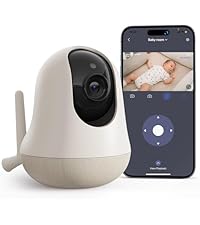
The nooie Baby Monitor is a cutting-edge 2K WiFi IP camera designed for indoor baby and pet monitoring. Featuring AI-powered 360° motion tracking, super IR night vision up to 32 feet, and two-way audio, it ensures comprehensive, crystal-clear surveillance day and night. Compatible with Alexa and Google Home, it offers seamless app control and secure data storage options, making it an essential smart device for modern parents seeking reliable, real-time connection and peace of mind.


| ASIN | B07PJ67CKC |
| Alert Type | Audio and Motion |
| Antenna Location | Baby Monitoring |
| Are Batteries Required | No |
| Best Sellers Rank | #7,973 in Baby ( See Top 100 in Baby ) #25 in Smart Baby Monitors |
| Brand | nooie |
| Built-In Media | Power adapter +Type-C Cable, User manual, Wall mount + screws, Nooie 360 Cam [email protected], |
| Color | white |
| Compatible Devices | Smartphone |
| Connectivity Protocol | Wi-Fi |
| Connectivity Technology | Wireless |
| Control Method | App |
| Controller Type | Amazon Alexa |
| Customer Reviews | 4.2 out of 5 stars 19,212 Reviews |
| Effective Video Resolution | 1440 |
| Enclosure Material | Plastic |
| Field Of View | 101 Degrees |
| Focus Type | automatically |
| Form Factor | Dome |
| Frame Rate | 15 fps |
| Indoor Outdoor Usage | Indoor |
| Indoor/Outdoor Usage | Indoor |
| Installation Type | Wall mount/Ceiling mount/ Floor-Mounted/ Stand/ Crib/ Shelf |
| Item Dimensions | 4.9 x 3.07 x 3.07 inches |
| Item Type Name | BABY MONITOR |
| Item Weight | 0.57 Pounds |
| Light Source | Infrared |
| Manufacturer | nooie |
| Manufacturer Warranty Description | 1 Year Manufacturer |
| Model Name | 360 Cam |
| Model Number | IPC100C |
| Mount Type | Wall Mount Placed on table |
| Night Vision | Night Color |
| Night Vision Range | 32 Feet |
| Number of Channels | 2 |
| Number of Items | 1 |
| Other Special Features of the Product | Adjustable |
| Photo Sensor Technology | CMOS |
| Power Source | Corded Electric |
| Recommended Uses For Product | Baby Monitoring |
| Room Type | Nursery, Baby Room, Kids Room, Play Room, Living Room, Bedroom, Kitchen |
| Shape | Dome |
| Special Feature | Adjustable |
| Specific Uses For Product | Baby Monitoring, Baby Monitoring for First-time Parent, Infant Camera for Room, Baby shower Gift, Adult Monitor for Elderly/ Grandparent, Child Monitoring, baby care |
| UPC | 751565991837 |
| Unit Count | 1.0 Count |
| Video Capture Format | MP4 |
| Video Capture Resolution | 2K |
| Voltage | 5 Volts (DC) |
| Waterproof Rating | IP65 |
| Wattage | 5 watts |
| Wireless Technology | Wi-Fi |
A**N
Great service! Get the add on stuff. It's worth it!
I absolutely love this product. I purchased 2 cameras and decided to pay the extra for recording videos and having the AI. Such a great tool to have. The AI is hilarious in its descriptions. But everything works fantastic. I wish I had this from the start. My little girl is already 3 and I needed a replacement monitor. But wanted something I could watch from anywhere.. this exceeds expectations. Super easy to install and get working. 0 issues. My only comment is maybe having the options for a louder noise when it detects movement but that's not that serious with a 3yo.
J**D
Great product!
We love this monitor! Image quality is great. Nighttime image is just as good as in the daytime! Major plus! Not gritty or pixelated or blurry. There’s an option to take a picture or video of the screen, which has allowed us to capture some super cute sleep smiles :) Set up was fairly simple. Wasn’t excited to download an app to use, but it’s simple to navigate and doesn’t include unnecessary features or ads. I really appreciate that you can be logged in on multiple phones at the same time on the same account! That means my husband and I can both be looking at the monitor but we only had to create one login instead of us each having to create one! Major plus for us! Biggest downside is that it connects to Wi-Fi, so when your internet goes down the monitor doesn’t work. Monitor also doesn’t come with a stand or mount, so that is an additional purchase. We tried two other monitors before this one and returned them because they were either too complicated or image quality was poor. This is a wonderful affordable option!
D**D
Great baby monitor
I have had Nooie for about a week now, and I’m absolutely loving it! This has been a big change for me in the monitor world. Up until now I’ve had the old-school camera and monitor. It was a very clunky system and I had trouble charging, but not with Nooie! it has been so nice to be able to check my phone from anywhere and see that my kids are doing allright. I have been using Nooie in my kids rooms as baby monitors, but they would work absolutely anywhere. They were super easy to install. The packaging was really cute and the camera itself is very sleek. the app is easy to use and set up. I love that I could invite people to join the app and my cameras. It feels very safe, and secure. there are a few things that I would love to see in the app. Mostly the ability to have a smaller screen still up and be able to do other things on my phone while still having the view of my kids rooms pulled up. I thankfully kept an old phone and am able to use that as a monitor, super handy! I feel like it would also work super well to have an iPad or tablet to use as your monitor keep your phone free for other work. Other than that the picture on the camera is great quality, especially compared to what I have had in the old school monitor game. The night vision is great and like I said, set up was super easy! It is a great product for the price point!
C**E
Great camera at a great price-point and simple to setup!
I have the Nooie 1080P indoor camera and I've been quite happy with it so I had to give this 360-degree model a try. It takes the features of the static camera and adds the ability to pan and tilt the camera either manually or you can enable motion tracking easily through the app. I wrote a review for the static camera and many of the features carry over including its great video quality so if you've read that review, some of this will seem familiar. Setup - Setup was very simple using your phone or tablet, running the free Nooie Cam app. You first need to verify that your phone is connected to the 2.4Ghz access point in your home where you will be using the camera. You then simply start the Nooie Cam app and select the +Camera button. You select the Nooie Cam 360 option and it will walk you through the remaining, simple steps. Basically, you assure the camera is on, enter the password for the wireless access point/router your phone is currently connected to (this is the same one you will be connecting the camera to), click Next, and a QR code appears on the screen of your phone. You now hold the screen of your phone in front of the Nooie camera's lens and it provides an audible tone and LED light indicator when it is finished reading the QR code. The app will now inform you that it is pairing and will begin a countdown. When complete, the app will inform you that pairing has completed. It's that simple. Use - Now that the camera has been added, you simply select it to view the camera. To hear audio from the camera, you select the speaker icon within the app and now you are able to see and hear what's going on around the camera. The camera also has a built-in speaker that allows you to press the microphone button within the app and then speak through it. This is very useful and/or just fun depending on where you locate the camera. For example, I have the camera in my living room where my cat typically spends a good part of her day. If you have cats, I'm guessing yours is similar where she doesn't have one place that she always lays within a room. She instead has multiple locations that she'll randomly select. With this 360 degree camera, either from home, from work, a restaurant, wherever I have WiFi or cellular access I can pan the camera from left to right and up or down. It's range is great where you can literally place the camera in the center of the room and, from the app, turn it from it's left side behind it all the way around front, through to the right side behind it just by swiping across the screen with the camera's image live the whole time. You can pan it around to see the entire room. Beyond this, you have the ability to tilt the camera up and down from the app as well by swiping up and down on the camera's image live. I can scan the room for my cat, locate her, and then touch the microphone to talk to her. Being a cat, she chooses whether she wants to respond or not. Sometimes her ears just perk up and she whines (which you can hear through the camera's built-in microphone), but other times she'll choose to walk over to the camera and give it some love. :) If you choose to use the Motion Tracking feature, if your cat, or anything really, moves in front of the camera's lens, the camera will follow it. As the moving option moves close to the edge of the camera's current visibility, the camera will move to center the moving object within it's vew and continue doing this until the moving object either stops moving or moves behind something where the camera can no longer see it. One thing to note with automatic Motion Tracking is the camera can pan 360 degrees. If something moves and the camera ends up pointing in a different direction than the next moving object. The next moving option must move in front of the lens at some point for the camera to see it and start tracking it. Depending on where you mount the camera and your use, this may be fine or it may not. So, definitely think about this before placing the camera if you plan to enable Motion Tracking. Video and audio can be recorded to either a microSD card or to the cloud. Cloud storage is a paid service. Given my usage, microSD recording is fine for me so I haven't tried the cloud storage option. MicroSD recordings are easily accessed through the app via a scrollable tape across the bottom of the screen. You select the day and then scroll through to the time you would like to view. If at any time you are viewing live video or recorded video from the app and you would like to save the video to your device, you simply press the camera icon on screen to set the start point, continue watching the video as it plays, and press the icon again when you'd like to stop and the video will be saved to your device. It's VERY easy! Like other security cameras, you can also setup notifications based on sound and/or motion. This too is easy to configure by selecting None, Low, Medium, or High for each option and then selecting the timeframe that you would like to receive notifications. Note that you can enable disable notifications by day, but each day only has one start time and one end time that can be selected. Meaning, you cannot setup notifications from 8am-5pm and then again 10pm to midnight for the same day. You could do one or the other, but not both. I don't see this as a problem for me, but it's worth noting depending on your use case. There are a few additional notable settings. First is the ability to enable/disable audio recording. I haven't done much testing with this, but I'd imagine this could save some space on your microSD card, allowing you to possibly record more video if disabled. Second is the ability to enable/disable the small LED light on the camera. If you placed the camera in a visible location in your home, you may want to disable the LED to avoid the distraction of it. Last, there is a Rotate Image option. So, if you need to mount the camera under an overhang, cabinet, etc., you can simple tap this button to flip the image for mounting the camera upside down and now viewing it live or recorded video will display right-side up. Customer Service - I reached out to Nooie's customer service prior to purchasing my previous camera as I had a number of questions. I received quick, thorough responses the same day, shortly after I had sent them. I worked with Julia who was great to work with. Very friendly, personable, and understanding. Julia's customer service was great and made the decision to purchase this camera a complete no-brainer. As I'm sure many of you know, when you have questions or something goes wrong you really find out what a company is made of. I'm happy to say Nooie's support is great! Regarding this camera, I had a few questions for Nooie support prior to purchasing it and received the same great, prompt responses. This proved even moreso that their support is great! It wasn't just a one time fluke with the first camera. Summary - This camera works great and has clear video. The two-way communication capability is an added bonus and could open up its use to more than just a security camera. It's ability to automatically track motion as well as it's ability to turn 360 degrees while automatically tracking motion and/or by manually swiping the screen coupled with it's low price point of under $40 makes this a great buy in my book! I am definitely glad that I added this camera to my home. It will work well keeping track of not only the cat, but I can see when my teenager comes and goes when I'm not home.
C**S
The worst thing I've ever needed to keep using
At our house, we utilize Alexa to automate and connect our tech — light switches, security system, camera, etc. Our security camera, Eufy, while compatible w/ Alexa, only displays a livestream for 5-10 minutes. That was unacceptable for our nursery so I began looking elsewhere and found, surprisingly, how difficult it was to have a camera livestream 24/7 to an echo show. I discovered the Nooie through a reddit thread and decided to try it out. It was a bit more expensive than my 2k Eufy camera but if it could stream 24/7, I was okay with that. I'd like to go over some details, none of them truly positive. Picture Quality: 3/5 The picture quality is okay. Low light is okay. Well-lit is pretty good. Night vision is okay. While the Eufy is incredible in all scenarios (relative to its price point). While the picture quality could not nearly compete with the Eufy 2k camera, it was okay so long as it could stream to my echo show. I actually still have the Eufy camera there to use when I really need a good look. Features: 2/5 I'll be honest, I don't use motion detection since it's for the nursery. I tried using sound detection for cries, but it would pick up every little thing. The Eufy has a specific cry detector which sends me a push notification so I still use that. Because of this, I'd say the features are pretty lacking for a specific baby-targeted monitoring camera. The 2k eufy camera isn't even marketed as a baby camera but it has cry detection lol. 360 pivot is fine, but nothing ground breaking. I will say that the redeeming trait is that it is able to push to my Echo 24/7... ish. Often times it lags out from buffering and will reset, but that happens once to twice a day, at most. And occasionally won't happen for a full 24 hours. It's inconsistent but at least it kind of works. Software: 0.5 / 5 I wanted so bad to give this a zero but that would be completely dishonest since it DOES work, kind of. The UX is AWFUL. To pan/tilt the camera, you have to swipe along the screen in an inverted direction, which makes sense like you're scrolling but it is not intuitive for a camera control — ESPECIALLY because there is a 2 second delay from when you swipe to when the camera moves. Get this, to make it even worse, the force/acceleration you use on your swipe determines the distance the pan/tilt goes. So with a 2-second delay and honestly a bit of a laggy application, I've at times accidentally rotated the camera a 180 degrees! Then I'm left swiping carefully in the opposite direction. I've spent upwards of a minute trying to reposition the camera. The Eufy has a simple directional arrow interface which works great. Of course there will be lag, it's simple latency of the camera going through my wifi network and being received by my app — it'll always be there with our technical limitations today; however, GOOD UX can FIX this. NOOIE TAKE NOTES, PLEASE! ALSO, JESUS. I put in an SD card so that I could have a timeline history of events. Which ultimately is pointless since there's no cry detection and it ends up recording 24/7, which is kinda useless. I'd love it to record on a cry, not really anything else. But anyways, the timeline interface IS BANANAS. Did they even test it? I work in the product/ux field and I could not figure it out. Granted, I spent maybe 5 min playing with it and thought it was so horrible I just took the SD card out and let the anger fill within me until I had the energy with a newborn to write this review. The timeline experience in the application is SO bad that it's unusable. It looks like they were trying to do something fun, playful, and cool, but this is such a flaw of design — GOOD design is the BALANCE, the HARMONY, of function AND form working in unison. A compromise of one over the other in ANY direction only makes the product worse — case in point, this application Nooie has us using. — To summarize, it's unfortunate. The camera itself is decent and the ability to connect with your echo show for long durations is a huge win. It's a huge shame that the biggest flaw of this whole thing is the software itself (I'm going to lump the lack of cry detection in the software since simple machine learning can fix this after the fact). It is a shame, but it isn't hopeless. Since it is mainly a software issue, a fix is also a software fix — way easier than a hardware fix. Maybe the buffering issue with the echo show canceling the stream can be a hardware issue, not sure there. Anyways, it's a huge testament that I got this camera and need to supplement it with the useful features of Eufy. While I praise Eufy above this, Eufy's biggest flaw is the whole echo show thing. It's so hilarious because it beats the Nooie in every other regard... but the echo show streaming lol. God, what is my life. Nooie, hire me. I can offer some consultative services to you and get your app headed in the right direction. Shoot, I'll even give you a discount because I need this to be better. Cheers, best of luck. Update as I made this too soon, just a day later from my review they released an update for the app. Now it won’t get out of full screen mode once I engage it. It is doing the most hilarious animation of the screen rotating, kind of minimizing, then rotating back and going to full screen lol. What a great update. ——— Update on Nov 24, 2022 Writing this on Thanksgiving as one thing I’m not thankful for is the Nooie. I saw they had made updates and was actually feeling optimistic when I noticed a directional interface to more accurately position the camera. However, a few things compound my frustrations and have taken this 2-star review down to a 1-star review. 1. While the directional keys are a much welcomed update, swiping on the screen still also moves the camera. So, when you’re pinching to zoom, you have a high probability of spinning the focus of the camera to the wall behind you. 2. Another thing with the directional keys — they’re present on the screen the WHOLE time and take up at least 30% of the view. Why not do what Eufy does and have a toggle to show/hide the directional keys? Utilize the right part of the screen for a button to do that… 3. It is now disconnecting from my Alexa device anywhere from 5 min to 30 min. I had mentioned this is the ONE redeeming factor of this camera is that it nearly stays connected to all my Alexa Echo Shows 24/7. I’m going to be shopping black friday deals for a new camera. 4. The app has gotten worse. Now when I leave the app in landscape orientation, I come back to some hybrid portrait/landscape view like the app didn’t know what to do. I have to restart the app to get it to fix. 5. This may be the worst… at times, the camera wont’ load at all. We end up closing/reopening the app multiple times to get it to work. That should be the one thing that actually works right. With that pointed out, this camera is now quite literally junk. It’s not usable.
A**R
Easy to use!
I can finally relax knowing I can see and hear everything clearly. Night vision is amazing—can see my baby perfectly even in the dark 🌙 This baby monitor gives me so much peace of mind 🙌 Super clear video and easy to use—love it
E**.
Yes....the Reviews Help me a Lot to make this Purchase Decision!!
UPDATE (JULY 04 OF 2020). -------------------------------- The Camera periodically makes a Clicking Sound when the ambient light goes down or when it is Dark Or at Night (IN ORDER TO ACTIVATE THE INFRARED SENSORS OR NIGHT VISION). For me, this is a bit annoying. But after Researching and Researching I found the Answer on the web... I share it... .......................... The clicking sound is normal for microbolometer-based cameras. It is a result of the camera's non-uniformity correction, or NUC. What you actually hear is the camera's internal shutter moving in front of the detector for a breif instant. This happens regularly on uncooled infrared cameras but it will also happen occasioanlly in the cooled infrared models. It is also referred to as an FFC - which stands for flat field correction. The shutter is a flat source for the detector to calibrate itself to output a uniform response. ..................................... So, Knowing this... I understand that Cameras at this Price Range or for this Purpose; it is a Normal thing. In fact, after Reading an Answer from a Seller of another Camera (Brand) of this Type of situation, the Seller Reply (Wrote)....... It will make a small clicking sound while turning on/off the IR lights which is normal. Hope you could understand. Thanks. ......................... So, this is a Normal thing. Enough for me to ask for a Refund or to take one star from the Review? Noup. I do Understand. This is still a Great Quality Camera for the Price. ................. (INITIAL REVIEW) To be Fair, we most Evaluate or Make a Review for a Product based on the Price we paid and the Quality we receive. Given the List Price of this Product of $49.99 Dollars I give this Product a 5 Star Rating, even though I must Test it overtime.(I will Update later...) PROS: * The Build Quality of the Product is Excellent. (I Add some Pictures). * Easy to Setup. * Functional APP * Price Point. * A large community that gives feedback about this product. * The Opportunity to share Nooie Cam's Viewing access to others. * You can Record to your phone directly, with no need for a Subscription or Micro Sd Card. This information is not clear at the moment of reading the Product Description or is not share like it should. YES, you can record directly to your phone, when accessing the camera. * Micro SD Card recording capacity. NEUTRAL: * The Picture Quality is Decent, Not Wonderful or Awesome, but Decent. CONS: * None so far for the Price. ROOM FOR IMPROVEMENT: In no were in the Product Description here on Amazon, when reading t does it show the FAQ Section that Nooie includes in ther website. Specifically one question important to me..."How to share Nooie Cam's viewing access to others?(FAQ). The answer is a bit Helpful and confussing at the same time..."You can easily share the viewing access of your device and family using the Nooie App. This will allow them to view through your camera; however, THEY WILL NOT BE ABLE TO CONTROL YOUR DEVICE......" My first Reaction to this was....What do you mean that THEY WILL NOT BE ABLE TO CONTROL YOUR DEVICE? That they will only be able to Watch in a still position with no opportunity to move the camera and talk to the microphone and record the camera? That was my initial Fear.....Thankfully the other person can have access to all the Functions. I shared the access to a Friend, who setup and create an Account (different than mine) and was able to Watch the camera, control the camera (moving it to the left and to the right, accessing to the microphone, and recording on the phone). So this is a Good Thing for me. But it is not clear or is not share in the product description in this page. For the Price and for the time being of using this product (firs day), I'm happy with my purchase. For the List Price, this was a Smart Purchase. !Thank You!
C**A
Camera is great
I bought this because I wanted one in my boys room so even if I'm in the other room I can watch & make sure they are OK. It was rather easy to install. The only difficulty I had was getting it to scan to connect but found it was the lighting. My son loves talking to me through it & it has helped at night with bedtime. One funny thing is he used to sneak in his room & empty his drawers & hamper. Well after installing the 360 camera he tried & I spoke to him through it & he hitailed it out of there as fast as his legs would go 🤣 he hasn't done it since! I am using SD cards for memory & have no issues. The two way communication works, night vision is better than expected! It does lag on following movement at night but not enough to worry me. During the day it's really good on following movement. It does plug in which is my only issue since my son has a habit of unplugging things but so far he has not messed with it. Also, no 2 ppl can have control which is ok with us. I have control & just invited my fiance to share. I'd add pictures but my son's sleeping. Overall I'm happy with the product. We have the wireless security cameras we will be installing next & I can't wait. Update: I think it's important people know that the communication between customer & a service provider is a must. I feel like I jumped the gun in buying all nooie products because I have sent multiple messages in the last month to nooie with no response. The 360 is the best one I've received from them but there are issues with their other cameras & I missed the deadline to return because I was trying to be patient. The only reason I like it now is the sd option for memory makes it easy with no subscription. I can have an eye on my kids all the time so less worry but at this point I'm thinking going a different route due to the lack of communication & unanswered questions. Update 2: Customer service now has it where they respond in 24 hrs. So far that's how it's been. I think the 360 is the better camera which can be useful in your nursery. I have 2 & have one in the living room so I can keep an eye on the kiddos while cooking.
B**L
Funciona perfecto para cuidar los niños
Puedes bajar a ver la TV y las alertas te dirán si se mueven o hacen ruido los niños, y les puedes hablar por ahí. Lo recomiendo mucho
H**T
Bueno a secas
Buena, lo malo es que siempre debe estar conectada a una fuente de energía y se calienta, si tuviera batería recargable le daría 5 estrellas
B**H
Great little camera
We love our Nooie camera, we bought this after much deliberation and couldn't be happier. The main reason we bought it is so grandparents could keep up with our daughters daily activities, the picture quality at daytime and night mode are fantastic, the motion following is just about fast enough to keep up with a toddler, the sound quality in and out are reasonable, but not amazing, we didn't expect it to be fantastic given its size. The app only allows the camera to be shared with 3 users plus the owner which is okay for us, but may not be enough if you want to use this camera for sharing with multiple users. Unfortunately despite having an SD card in that meets their requirements it never appears to record anything to playback later! im still trying so hopefully changing some settings might work, but it isn't quite as simple as plug in and record (at least not for me) Overall a fantastic product and just what we wanted. We might get a second to add to different rooms.
M**I
يوجد افضل منها
المشاكل اللي واجهتها : التعليق حيث انها دائما توقف الشاشة مع ان الاتصال بالانترنت عندي جداً عالي وان كان لا يوجد تعليق تاخير من ثانيتن الى 5 ثواني الدقه ليست عاليه والرؤية الليلية ليس عاليه ولا يوجد خيار تشغيل الرؤية الليلية دوماً حيث اوقات تطفا وتشتغل الرؤية الليلة لو فيه اناره خافته مقارنة بمنتجات اخرى نفس السعر ، لاحظة انها ترافع حرارة العدسه بطريقه غريبه جربت وحده ثانيه من شركة imou كانت اكثر عملية منها استخدامي لها كان مراقبة ابني في المهد
M**A
Best, but not for everyone.
Reviewing this after using for about 45 days. Possibly one of the best baby monitors out there. It is worth spending that extra few thousand rupees. Why? Because of the following: 1. Can connect directly to multiple mobile phones. You and your spouse can see it from office or from the next room. 2. You can talk to the nanny directly from the cam. 3. You can hear clearly if your baby cries. Infact the sound is extremely sensitive. Even careful door open or closing which won't disturb the baby, is still picked up on the app. 4. It has motion tracking. Even your curtain movement will be notified. Can get irritating but you can turn motion tracking off and then adjust the camera angle from the app as you like. 5. Has excellent night vision. 6. Notifies you if there is movement, sound or baby cry. Notifications can get irritating for some. 7. You can get cloud storage and also store on a local memory card. Or even record video via their mobile app. 8. Have noted extremely little lag at times. Possibly around 1-2 seconds. 9. It has a wide coverage angle. So even if you don't install it at the top corner of the room and just keep it in front of the bed or some other corner, it will still give an extremely good coverage. And its motion tracking can also cover almost entire room. 10. It is plug and play. If you don't want to involve an electrician and your socket is close to a good vantage point which can cover the entire room, you can directly plug and charge it like a mobile. Also makes it portable. We have used it to monitor her play area and bedroom and even used it when we went out for vacation. Cons: 1. It needs constant power. Therefore, your nanny or baby can turn it off if she knows the switch. Therefore it isn't for all. 2. You need to keep your app constantly open for all the above. So be ready with a battery backup for your mobile. Hence, it may not be for you if you have only one mobile. You might prefer a camera with a dedicated screen for this primary reason.
Trustpilot
3 weeks ago
2 weeks ago