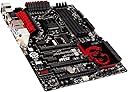
๐ฎ Dominate the Game with MSI Z87-GD65 โ Power, Speed & Precision in One Board!
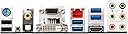
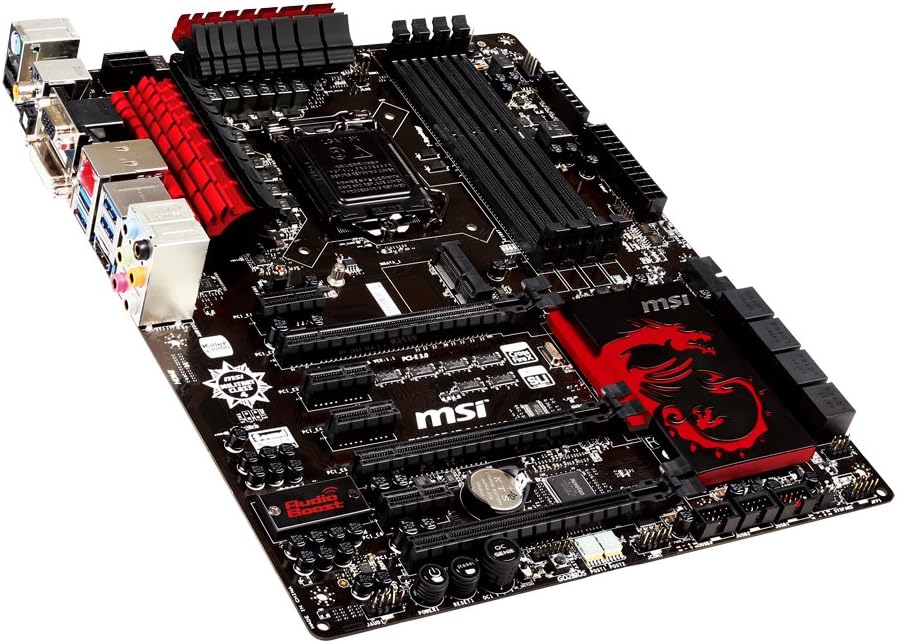
The MSI Z87-GD65 GAMING motherboard is a robust ATX platform designed for Intel 4th generation processors with LGA 1150 socket. Featuring the Intel Z87 Express chipset, it offers triple PCI-E 3.0 x16 slots for multi-GPU setups, Killer E2205 Gigabit Ethernet for optimized network performance, and Military Class 4 components for enhanced durability. With USB 3.0 and SATA 6Gb/s connectivity, this board delivers high-speed data transfer and versatile expansion options, making it a top choice for gamers and professionals seeking reliable, high-performance computing.
| ASIN | B00D12OBYK |
| Best Sellers Rank | #3,795 in Computer Motherboards |
| Brand | msi |
| CPU Socket | LGA 1150 |
| Chipset Type | Intel Z87 |
| Compatible Devices | Gaming Console |
| Compatible Processors | Intel Core i3-4xxx, i5-4xxx, i7-4xxx, i3-5xxx, i5-5xxx, i7-5xxx |
| Customer Reviews | 4.1 out of 5 stars 88 Reviews |
| Global Trade Identification Number | 00816909106961 |
| Graphics Card Interface | PCI Express, PCI-Express x16 |
| Item Weight | 4.5 Pounds |
| Main Power Connector Type | ATX |
| Manufacturer | MSI Computer Corp. |
| Memory Clock Speed | 2133 MHz |
| Memory Slots Available | 4 |
| Memory Storage Capacity | 64 GB |
| Mfr Part Number | Z87-GD65 GAMING |
| Model Name | Z87-GD65 GAMING |
| Model Number | Z87-GD65 GAMING |
| Number of Ethernet Ports | 1 |
| Number of Ports | 19 |
| Platform | Windows 10 |
| Processor Socket | LGA 1150 |
| RAM Memory Technology | DDR3 |
| S/PDIF Connector Type | Optical |
| System Bus Standard Supported | SATA 3 |
| Total Number of HDMI Ports | 1 |
| Total PCIe Ports | 7 |
| Total SATA Ports | 8 |
| Total Usb Ports | 5 |
| UPC | 957025880639 922707075092 807320213833 670826298631 132017758336 816909106961 |
| USB 2.0 | 2 |
| Unit Count | 1.0 Count |
J**G
Great Gaming Motherboard, Without the Massive Price Tag
This board looks amazing. I recently got a HAF X case to put it in, and it just works well with the black and red combo. It has a ton of fan ports compared to my LGA 775 setup, a good amount of SATA III connectors, USB 3.0 connectors, and the test leads is a nifty idea. As soon as I pulled it out of the box, it just oozed with quality finish and parts. I literally stared at it for hours. The Killer NIC is an ok feature. I am not sure how much it improves network travel, as it seemed to stay the same during my use. Some applications, such as iRacing, you have to tell the NIC to back it down to normal, otherwise iRacing will think your connection keeps dropping in and out every 5 seconds. EDIT: After doing a few tests, I did notice that the NIC will help applications, such as Ventrilo, maintain proper bandwidth while there are downloads running. My last board used an Intel NIC, and any download would shoot the ping up to 300+. With the Killer NIC, I had 3 downloads at once running, and it helped maintain Ventrilo around 20ms. The Creative application is pretty cool. It has Movie, Music, and Game settings so that you can set the surround, bass, crystallization, and other features depending on the mode. The MSI Command Center and Live Update utilities make it very easy to keep track of motherboard updates. It will even update the BIOS in Windows. You can even pick and choose what you want to update, and have it download/install with one click. I read many reviews for boards in this price range, it was between this, ASUS, and Gigabyte. All the reviews kept having me come back to this MSI board, and I am glad that I did.
A**W
Beautiful MB, awesome BIOS settings layout, everything works as advertised!
For some of you still debating or not sure about this board, don't worry, it works, very well! I helped my teen son to build his first ever PC and for gaming, it is just awesomely nice. It has been running for a couple of days now without any problem, i will return and update with more information. I just want to note one thing before hand that we were nervous about, after reading that one review in here mentioned that it can't be boot up from the DVD drive and must went with the USB. We found it worked for us. We got this MB with the Pioneer 15X SATA BD/DVD/CD burner (BDR-208DBK), and ran the boot up from this drive with Windows 7, and it picked up and installed just nicely at first try, less than 30 mins later and it completed the installation. We installed the drivers disk that came with this MB, installed the MSI GTX 780Ti's disk, and the perfect screen with awesomely graphic came on to view. One other quick item to mention, there are 3 fan connections provided on this MB, but the son's HAF-X case has 4 fans total, we couldn't connect the side-panel fan to it (any tips guys?) Regarding the Windows 7 installation, my son as everyone else likes the Windows 7 for his gaming PC, finding an OEM Pro version with a disk package was painful, but i was luckily enough to find a copy in a nearby BestBuy store (the sale guys didn't even know they have it in stock), we didn't even make a bootable USB and just went with the Windows 7 original disk boot up in the Pioneer drive. Little time with many information to share - will update as soon as free time permits.
J**S
Pricey but still a solid choice
I built my own computer from scratch using fairly high end components. I've used this mother board for about 13 months now and below are my thoughts on this motherboard. What I like: 1) I ended up picking this motherboard for a couple reasons. Upon comparison of more than a dozen motherboards, this one fit the widest range of RAM speeds while also supporting Crossfire for Video cards 2) The BIOS was extremely easy to navigate. 3) Overclocking components is a breeze 4) Installation was easy and fast 5) Plenty of fan plugs to power all of your tower fans. 6) Very reliable thus far with no major issues. What I didn't like: 1) My only complaint so far is that the socket is a 1150, not a 115x. This limits your CPU selection by a good amount. 2) USB 3.0 seems to have issues with this motherboard. At first, I couldn't get them to work. Then I got both working after a few weeks of playing around. Now only 1 works. 3) It was slightly difficult to mount my CPU cooler to this board but after some struggling, I got it. The motherboard was a little expensive compared to similar boards but I have no regrets about buying it even though if I had to, I'd get the latest model and not get this exact board again. Overall, it's a solid board capable of handling pretty good loads on it. I tested my entire system running Farcry 3, Rome Total War 2 and BF4 at the same time with no real issues and since the motherboard ties everything together, it was a good test for it.
M**K
First time MSI BUYER
I am a first Time buyer after being burned by ASUS recently. I bought this board to help teach me how to over clock. The board arrived on schedule and without damage. Now to the board - my one complaint is that there is no PCI slot on the board, which I would have liked at least one. That being said I DO like that the board has an HDMI port as I intend to hook it my system up to my TV - THANK YOU! You saved me buying a converter for USB to HDMI! I also like that the board has a push button power button mounted on the bottom right. This made testing as I was building much easier. I was warned against buying MSI, but then the same people said ASUS was great (I disagree), I am extremely satisfied with the board and it's price point of $180. The install was easy, though the official MSI install video on youtube is not worth watching. The instructions DO assume a certain level of PC knowledge so they basically tell you hook up the cables correctly then do the next step. I was fine with this as I KNOW how to hook the cables up, but for a beginner I would reccomend some independant research before trying to build. The Manual did have some nice illustrations on how to plug the power, reset and other cables in to the little one piece plug they provide you with. A good board - I am very happy with this so far
R**M
Pass on this one
PROS: This board is very sleek looking, but without a windowed case it is kind of a waste. Im coming from an old build with a Phenom II x6 1090T and even though it was one of the last great chips made by AMD I can already tell a huge increase in speed and performance with the 4670K (my 19th build and Im finally making the switch to Intel). And the motherboard alone seems easily 5x's faster than my other boards. Although I did pay about $60 more than I usually do for a board. Some useful software comes with it on the disk. The OC genie button seems nice, although I havent used it yet. The BIOS reset and internal power buttons are a welcome addition. The improved audio has a small increase in quality but nothing major that sends it over the top. CONS: Installed this Motherboard friday night and it has been a nightmare for some things. First off if you use any sort of water block cooling, closed loop or not, DO NOT get this board. I own an H80i and it made installation horrible. First off, the upper left cooling plates on the Motherboard are a bit too high and my H80i sits right on top of them. Second, the 8 pin motherboard power connector is located to close to the left side of the the board making me have to plug the pins in before setting my H80i in the case. The bad part of this is that is smashes down on the connection port and you have to kind of bend/flatten the cord to be able to get the cooler on. I think you might be okay with an H60i but not the H80i or H100i. Third, it seems that some of the important components like the chip slot and RAM are shifted to the left by about half an inch or so. This poses a problem when installing the water block on the CPU because of the rubber hoses on the right side of the water block. It applies pressure towards your first DIMM slot and you have to press hard back on the hoses just to get the RAM in its slot, once you arent pushing the hose connections reapply pressure and pushes against the 1st RAM cartridge, so far it doesnt seem to effect performance but it does make me worry about later on. The back of the board is slightly sticky, I am not sure what but I would think left over solder residue. Not a big issue, just makes the board feel dirty. The placement of the USB 3.0 port on the board is absurd. Plugging the front panel USB port into it causes it to apply pressure at an angle since most front panel USB cords are made of stiffer but flexible plastic sheathing. There is no lock mechanism to keep the connection secure. The Killer e2200 Network LAN is atrocious. I am still doing battle on getting it to work properly because it keeps slowing down and dropping connections, whether you are gaming or downloading. The bundled software manager with it is horrible, like bloatware that doesnt need to be there. No other board parts other than 6GB SATA connectors. Would it have been too much to include a board speaker with the equipment so I can hear it post? Had one immediate issue that was solved with MSI, my chip was sitting at 3.8 Ghz instead of 3.5Ghz and I thought the board had overclocked automatically or something else was wrong. But MSI informed me that the Intel chips come with an auto frequency that adjusts based on your setting, so since I had mine set to power mode it had throttled all the way to max. One thing I will say already is that this is my first MSI product, but their response time is astounding. Asked question and in less than 15 minutes I got a reply back. ASUS couldnt even come close to covering to that. Overall the board is fast and works well minus Killer's Ethernet. the GUI is taking some getting used to since Ive never dealt with a UEFI set up before. The only super downside to the board is the layout, it will not work with some setups and equipment. Some monkey work and cursing of certain companies may be required. If I can get the E2200 to work properly and get a stand alone driver for it, I will update the rating but until then I have to stick with a meh for all the hassle ive had to get through. UPDATE: I have changed my review to a 1 star (Wish it could be less) the killer network keeps saying it is bad. There is no stand alone driver to be found online for this. It is causing Havoc with my connection dependent software. Microsoft OneNote for example cannot even be used because it causes Issues. This is a horrible board. Do not buy
S**K
Usual mice and keyboards work fine, but other things may give you problems
had some trouble with USB ports not working right with everything I plugged in Win 7 64 bit. I read from several sources that it is a MSI problem in their bios that they have not fixed. Usual mice and keyboards work fine, but other things may give you problems, ie headphones, memory sticks, usb drives, and other devices.
E**H
Everything about this motherboard is great, except that it does not offer true VT-d Technology.
Everything about this motherboard is great, except that it does not offer true VT-d Technology. It only supports VT-x. I worked for 2 months trying to stabilize VT-d (Direct Hardware Virtualization) and could not get virtual machines to access my hardware directly. This escaped the return window, as I would have exchanged this for a board that natively supports it. I am still using this board for a gaming machine and it will serve its new purpose very well. Unfortunately I was unable to use it for virtualization.
A**H
Would Buy Again
Pros: Solid and well built Works great Awesome UEFI BIOS OC Genie Aesthetically pleasing (My case has a window on it) Lots of pretty lights Debug LEDs are nice Killer e2200 networking works well Sound Blaster Audio is good, but I'm not an audiophile Cons: When I got my motherboard, there was a small loose screw in the anti static bag, which scared me but the board works fine. I'd give it 4.5 stars because of the small quality control issue. I would buy this board again and recommend it to my friends.
Trustpilot
2 weeks ago
2 weeks ago