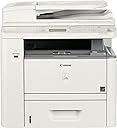
โก Power through your print jobs with speed and style!
The Canon imageCLASS D1320 is a robust wireless monochrome laser multifunction printer designed for mid-volume office use. Delivering up to 35 pages per minute with automatic duplexing, it supports large paper capacity expandable to 1,050 sheets and features a user-friendly 5-line LCD. Energy Star certified with a low 2.3W standby power draw, it balances high performance with eco-conscious operation, making it ideal for professionals seeking reliable, cost-effective black-and-white printing, copying, and scanning.
| ASIN | B007HK0KXI |
| Additional Printer Functions | Copy |
| B&W Pages per Minute | 17 ppm |
| Best Sellers Rank | #1,223,473 in Office Products ( See Top 100 in Office Products ) #1,968 in Laser Computer Printers |
| Brand | Canon |
| Built-In Media | 500-sheet front loading cassette, 50-sheet multipurpose tray, Legal size platen glass, 50-sheet multipurpose tray |
| Color | White |
| Color Depth | 1 bpp |
| Color Pages per Minute | 15 ppm |
| Compatible Devices | Computers and laptops with an Ethernet port running on compatible operating systems (Windows, Mac OS X, Linux) |
| Connectivity Technology | Ethernet |
| Control Method | App |
| Customer Reviews | 3.6 out of 5 stars 127 Reviews |
| Display Type | LCD |
| Dual-sided printing | Yes |
| Duplex | Yes |
| Global Trade Identification Number | 00013803129786 |
| Hardware Interface | USB 2.0 |
| Initial Page Print Time | 8 seconds |
| Ink Color | black |
| Item Weight | 45.3 Pounds |
| Manufacturer | Canon USA (Lasers) |
| Maximum Copies Per Run | 2100 |
| Maximum Copy Resolution Black and White | 1200 |
| Maximum Copy Speed Black and White | 35 ppm |
| Maximum Media Size | 8.5 x 14 inch |
| Maximum Print Resolution Black and White | 1200 dpi |
| Maximum Sheet Capacity | 500 |
| Model Name | D1320 |
| Model Number | D1320 |
| Model Series | D1300 |
| Number of Drivers | 2 |
| Number of Ethernet Ports | 1 |
| Number of Trays | 2 |
| Other Special Features of the Product | Auto Document Feeder |
| Paper Size | 14 inches |
| Print media | Paper (plain) |
| Printer Connectivity Type | Ethernet |
| Printer Output Type | Monochrome |
| Printer Type | Laser |
| Printing Technology | Laser |
| Processor Count | 1 |
| Resolution | 1200 x 600 |
| Scanner Type | Document Scanner |
| Series Number | 1300 |
| Special Feature | Auto Document Feeder |
| Total USB 2.0 Ports | 1 |
| Total Usb Ports | 1 |
| UPC | 013803129786 |
| Warranty Description | 1 year exchange/carry-in |
| Warranty Type | limited warranty |
| Wattage | 550 watts |
P**J
Don't pass up just because it is not 'wireless'!
After reading many bad reviews on wireless color printers, decided to go with this more 'basic' machine. So far we are happy with this purchase: PROS: -Even though it is not 'wireless' we were able to make it wireless by connecting it to a wireless range extender and networking to our Macbook. It was fairly simple to figure out and I am a computer novice. The additional positive is that eventhough printer is in 'energy' saver mode, it seems to have no problems with accepting the print or scan job - unlike the many complaints on the wireless models. -Quiet -Fast page output -great print quality -Black Laser cartridges are more cost effective -Compatible with Mac -Auto Duplex printing -Fair Price -Seems sturdy and hoping it will last several years unlike our Canon Pixma color laser jet. CONS: It is large & heavy! However with the wireless range extender we were able to put it in a closet out of sight. Not a color printer - but we decided the small amount of color printing we do was not worth the expense for Toner.
N**L
For what we use it for it is great. It scans well
For what we use it for it is great. It scans well, not super fast but well. The first page out is actually pretty quick when it comes to printing or copying. The rollers that pick up the paper is the only thing we have had clean or it stops picking up paper after a long while. Otherwise, met what we expected it to do.
S**W
This printer is TERRIBLE! First
This printer is TERRIBLE! First, the double-sided feature broke. It just stopped working. We returned it to canon and received a refurbished replacement. This printer was WAY WORSE than the first one. It prints one copy at a time and then gives error messages about paper jams (the paper is not jammed) When we called canon to get it fixed, they said that it was out of warranty. What kind of terrible warranty policy is this? When the printer doesn't work, you get a refurbished machine? They won't send you a new one? And then when their refurbished junky printer doesn't work right off the bat, they won't fix it? This is a terrible product and a terrible company. They should no longer be in business. I WILL NEVER BUY ANY CANON PRODUCT EVER AGAIN!
J**D
A Practical Economical Copier for Any Small Business
UPDATE: 6 months after we bought it, the paper feed tray disintegrated. The parts broke for no reason, and it only will print on the paper in the exterior outlet - the one that pokes the paper directly into the chest of the person who is trying to make a copy. I checked with Amazon, the warranty period for returning it was over about a month after I bought it. Amazon said, Canon has a 1 year warranty. I tried several ways to get in touch with Canon, but their web site doesn't even recognize the word "warranty", and they have discontinued this series. Oh, well. It's a $300 lesson to me in reasons to buy the warranty in the future. My Canon MF 6530 has been working for over 10 years, so I've had success with Canon, just not this one. I've been using this in our business for a few weeks now. PROS: the toner is inexpensive. That's always the #1 with a bullet factor we use when buying a new copier. It's a Canon. We've used them for years, and they last for years under heavy business use. The paper carrier is fast and never/rarely gets stuck. It pulls a pile of sheets through even different sizes and copies each and every one of them flawlessly. You can hook it up to your computer and use it as a printer. It has other functions that I haven't even begun to explore yet. CONS: The legal size paper slot is in the front - it pokes at you when you're trying to make legal size copies. I thought the collate button required way way way too many buttons to reach to turn it on. It's easy to use, but stabbing more than 2 buttons to turn on the collate function is wasteful. Bottom Line: It's a good deal. It's a practical product that is a good buy for any small business.
0**0
Works OK
It was hard to get it setup for A4 paper. There was sensor for the paper that did not react until I found it and played around with it a bit. Before that I wasted a lot of time following the directions and not able to get it to work correctly. This copier / printer is most likely fine and has been working OK in a small office with 10 people. There are better Canon copiers out there but this seems to work for me for now.
Q**I
Replaced a Traditional Copier Wished I Had My Old Copier
I replaced a traditional copier. When I called my copy machine guy, he told me that now everything was MFP's and that with my volume at my office I would be better off buying a cheap MFP. I will probably dump this in a few months. I am very proficient at installing and hooking things up to a computer. This was not easy. For the life of me, my secretary and I cannot get it to print envelopes. Many things that go through the bypass won't go through. I am so grateful my HP Laser Jet 5 still works. In Word, it automatically defaults to double sided copies. So for each Word documents, there is now a longer process of prior to printing, having to change settings. It just adds additional steps to printing. I don't think it is user friendly and as stated above often have to use the HP 5 for printing. I have to look at it as I was replacing my copier and I should just be using it for a copy machine. Using as a copy machine it works fine. Trying to use it as a computer printer is problematic. My secretary does use the scanner on it. There is no way I would even attempt to use the fax. Instructions are not clear.
G**Y
Great for small offices but can still do big jobs!
This is really great copier for a small business like ours. Our copying needs are not what they used to be when we needed the larger Minolta machines but when I do make copies, I need to make them fast and they need to be good quality. This item fits the bill. It's small enough to fit near my desk so it's more convenient for me to make copies now instead of getting up and going across the room. The start up for the first copy is quick and it prints out just as quickly. I haven't had any jams so far and I've even done legal sized copying with no problems.
J**Y
Not as user friendly as my old HP
I bought this to replace an HP 4000 series printer that I have loved for 10 years, I just wanted a faster printer at a reasonable price. This multi-function machine really does a great job, however it is not user friendly. After hours of work trying everything I could try on line I finally called customer service.to ask if I could program the printer to use the multifunction tray to feed any time I had it loaded. The answer was NO. MY HP would do this. Now, if I want to use the multi-function tray I have to spend a minute or two to program it.. Then I have to reprogram it the next time. This is just too time consuming to use in a busy office situation.
Trustpilot
2 months ago
2 weeks ago