Buy anything from 5,000+ international stores. One checkout price. No surprise fees. Join 2M+ shoppers on Desertcart.
Desertcart purchases this item on your behalf and handles shipping, customs, and support to Vietnam.
🚀 Elevate your storage game with speed, security, and scalability!
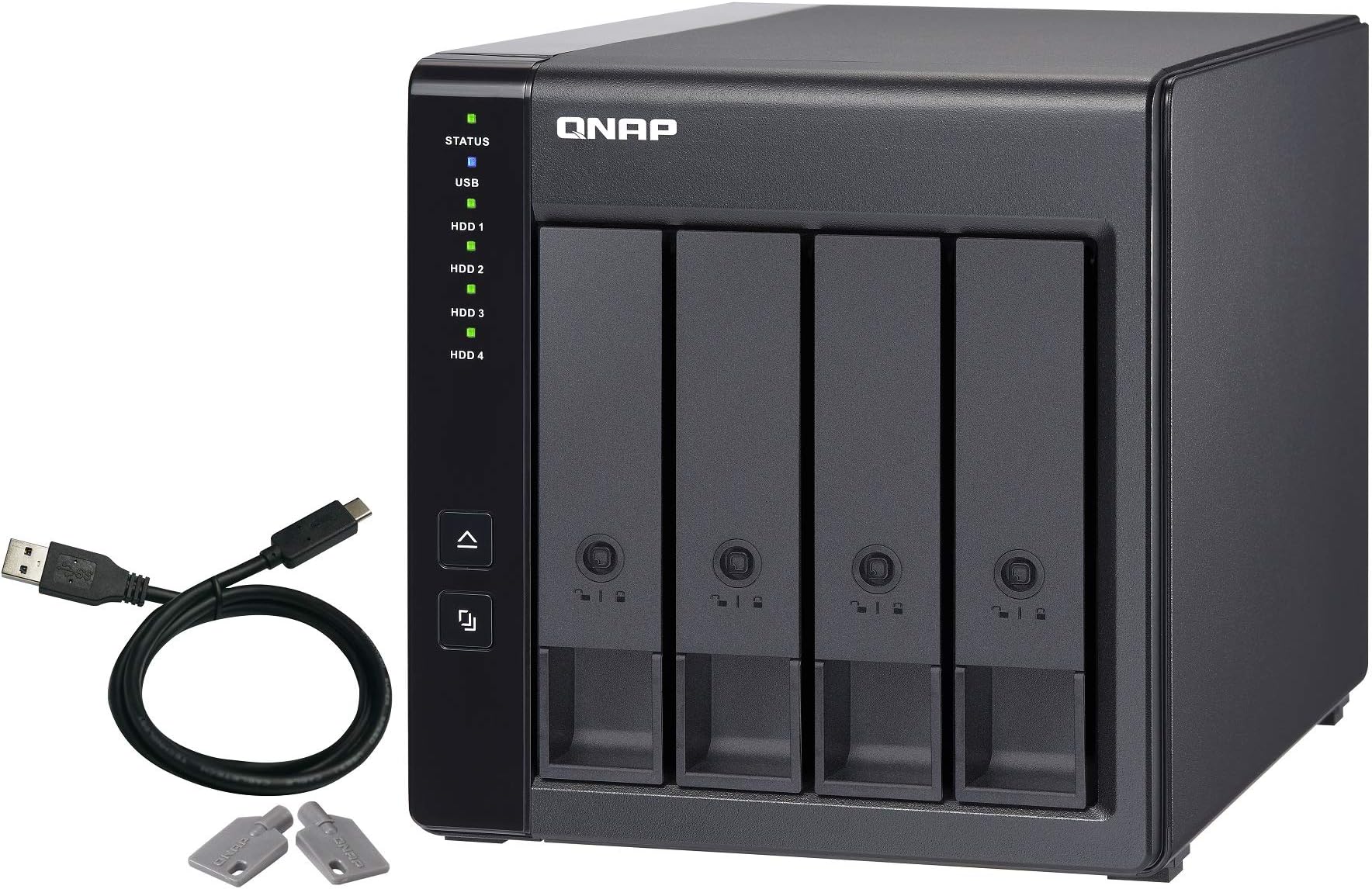
The QNAP TR-004 is a sleek 4-bay desktop NAS expansion enclosure featuring USB 3.2 Gen 1 Type-C connectivity for ultra-fast 5Gbps data transfer. It supports up to four SATA drives, offering flexible RAID configurations via hardware/software control switches. Designed with lockable trays and an easy eject button, it ensures secure, reliable, and scalable storage expansion for both NAS and direct-attached setups.


| ASIN | B07K23ZJFN |
| Best Sellers Rank | 57,013 in Computers & Accessories ( See Top 100 in Computers & Accessories ) 32 in Network Attached Storage (NAS) Devices |
| Box Contents | AC power adapter x 1, Drive tray keys x 2, Power Cord x 1, Quick Installation Guide (QIG), Screws for 2. |
| Brand | QNAP |
| Brand Name | QNAP |
| Colour | Black |
| Compatible Devices | 3.5-inch SATA 6Gb/s, 3Gb/s hard disk drives 2.5-inch SATA 6Gb/s, 3Gb/s hard disk drives 2.5-inch SATA 6Gb/s, 3Gb/s solid state drives |
| Compatible devices | 3.5-inch SATA 6Gb/s, 3Gb/s hard disk drives 2.5-inch SATA 6Gb/s, 3Gb/s hard disk drives 2.5-inch SATA 6Gb/s, 3Gb/s solid state drives Compatible devices 3.5-inch SATA 6Gb/s, 3Gb/s hard disk drives 2.5-inch SATA 6Gb/s, 3Gb/s hard disk drives 2.5-inch SATA 6Gb/s, 3Gb/s solid state drives See more |
| Customer Reviews | 4.1 out of 5 stars 518 Reviews |
| Enclosure Material | Metal |
| Is Assembly Required | No |
| Item Dimensions D x W x H | 30D x 32W x 25H centimetres |
| Item Type Name | QNAP TR-004 4-bay 3.5" SATA HDD USB 3.0 type-C hardware RAID external enclosure |
| Item Weight | 1.85 Kilograms |
| Manufacturer | QNAP |
| Manufacturer Part Number | TR-004 |
| Material | Metal |
| Model Number | TR-004 |
| Mounting Type | Tabletop |
| Product Warranty | 2 year manufacturer |
| Product dimensions | 30D x 32W x 25H centimetres |
| Size | 4 Bay |
| UPC | 753459221259 |
| Unit Count | 1.0 count |
M**H
Great choice for home storage
I read far too many online reviews before picking this drive bay and I’m really happy so far with choosing this one. I wanted a USB connected solution rather than a NAS as it means everything can be remotely backed up via Backblaze. I have the drives connected to an M4 Mac Mini and everything is working really well.
R**T
Useless. Totally useless
I bought this to extend an existing QNAP NAS and I wish I'd never bothered. It's possible to get it to interact with the NAS after endless tinkering but as soon as you restart the NAS, it's almost impossible to get this to reconnect. Eventually after rebooting both devices in different orders, one might be lucky enough for the RAID to reconnect, but it takes far, far longer than it should. Additionally, you can't extent the device once you install it. I bought this with 2 drives, planning to add 2 more later. Doesn't work. This is the single worst tech device I've ever bought.
M**T
Cheap way of building a hardware RAID
This is sold as an expansion caddy for a QNAP NAS – but I'm using it as directly attached storage for my home server. It functions perfectly well as an external caddy, and provides a little more functionality than a standard 4-bay external caddy, at a price that's competitive with other reputable brands. The Interface is USB-C, so it's pretty straightforward to connect to a PC or Mac. There are dip-switches on the back that allows the user to select between RAID 0, RAID 1 and RAID 10 – or leave the caddy in JBOD mode, so your computer recognises individual disks inside. I was a little wary of this – assuming one false move with the dip-switches would wipe everything – but after moving the switches, you still have to press and hold a button before anything useful/calamitous can happen. The buttons and switches are nice and sturdy, so there's no danger of doing anything accidentally. There's a big 120mm fan on this, which means it turns a little slower and runs a little quieter than on units with an 80mm equivalent. It's doing a good job of keeping everything cool. Running with minimal load, the 4x12TB WD CMR drives I have inside are running at 35°C for slots one and four, and 37°C for two and three. Setup as RAID 0, when copying 32TB of data to the drive, temperatures peaked at 55°C (S.M.A.R.T status) is viewable through the QNAP external RAID Manager software that comes with the device. I've had not particular problems with that. It did have a crazy day of going off-line in 12-second bursts four or five times. Can't figure out what caused that, may have been nothing to do with the unit – but it's been up now for two months and, that day apart, has ran like a sewing machine. Speed-wise, it doesn't seem to be particularly quicker than using a software RAID system like SoftRAID. My files copied at around 7GB per minute, which is what I'd expect from a JBOD caddy – but the Mac Mini to which this is attached seems much more spritely with this Hardware RAID attached than it did running a software RAID. So, overall, I'm very happy with the purchase.
T**G
Work for 3 days, my Mac do not regonize the unit anymore. USB 3.1 Gen 1 only no Thunderbolt???
Intended to use as a DAS with my Mac, so that I can keep the set of hard disk take out from a Drobo which is no longer in the market and not waste it. Aferall, case only DAS array is of very limited choice. Mostly are Mainland Chinese brand while QNAP is a relatively famous Taiwan brand. Got it and happily used for 3 days. (I just casually connect it to a TB4 port in my Mac Studio M2 and/or a USB C or TB3 port in a Lacie External RAID connected to my Studio. Suddenly it beep and said one of my HDD is fail. I take it out and insert with other disk. connected to an old 2017 iMac with its build in TB3 port, I still can build the RAID group. But it lost connection after that. The USB lamp in the unit do not lite up and both computer cannot regonize it. Contacted QNAP, sent to RMA and sent back. Same issue. Then support said the Unit is okay, and claim it can only using USB 3.1 Gen 1 ports on the devices. And not a thunderbolt port. While I am sure it once works with the TB4 port in my Mac Studio and the TB3 port in my iMac (and I only connect the QNAP to this computer with the build in port) I can never get it mounted again. Support always ask me the same question and did I try without HDD. Absolutely despair. after all these the return window was close but lucky amazon still allow me to return. I notice I am not alone, there is one more 1 star review with similar issue.
P**E
Perfect add on for my current QNAP NAS
I bought this to expand my QNAP 4 bay NAS. It was easy to set up and I have 36 TB of HDD in there and runs perfectly alongside my 451+
J**N
My second one - superb.
It was time for me to upgrade as I'd filled by previous one of these. They work so well I just bought another five years later. Highly, highly recommended.
A**R
Avoid with TrueNAS / ZFS
TL;DR: If you're planning on adding this to a TrueNAS... well NAS, or using ZFS with another OS, there's a huge gotcha with this device. It doesn't expose the IDs of the disks themselves, instead they show up as "TR-004 DISK0[0-3]" which, apart from an ugly message from TrueNAS complaining about it, leaves you at risk of a corrupted pool if you move the disks around. Anyway, I bought this DAS hoping to use it as external storage for a NAS. I'm aiming for a cheap and low-power solution so have decided to go with an old laptop and external USB drives. This looked like a good solution - easy to access drive bays and low power consumption according to the spec sheet. Unfortunately, since purchase I have been feeling like perhaps I've made a mistake. First impressions: It's a small and quiet piece of kit, not much bigger than the 4 3.5" drives you would be putting inside. The Disk Trays are kind-of but not really tool-less. You can use without screwing the drives in but this is not recommended by the manual. Other than that, it's an unassuming black box with some LEDs on the front. The LEDs are bright enough without being too bright. In terms of power consumption, it is very frugal. About 1W without disks, and around 20W when fully populated with disk access. A general rule of thumb for HDDs is that they consume around 5W-10W, so there's very little overhead added by the device. This is the biggest selling point to me. Functionality: It's a USB disk enclosure, you put disks in and it makes them accessible over USB. There are a couple of modes which are controlled either by DIP-switches on the rear, or via the QNAP software. There is a "JBOD" mode, which is kind of the wrong name, which consists of each drive being used sequentially. If you put 4 500GB drives in there, and load it up with 900GB of data, you'll get 1 fully used drive and 1 drive that is 80% used, with the rest at 0%. I don't know what happens if a disk fails in this mode. You would normally assume JBOD to mean what they have termed "Individual" mode here, so let's get onto that. In Individual mode, you can access each disk as a completely separate drive, which allows you to utilise software RAID solutions (assuming they're ok with USB-attached storage). This is the mode I'm using as I want to utilise ZFS. The unfortunate issue here is that they are presented in order as "TR-004 Disk 0[0-3]". This means that drives are identified by the bay they're using, and not the drive itself, so if you move disks around this could confuse standard software RAID. TrueNAS makes a point of complaining about this, although you can ignore it. This is workable but not ideal - it might be a good idea to use a label maker to label which drive goes where. Note that you can determine the mapping of ID to disk if you use the SMART data of the drives. There are also other RAID modes, the standard ones you may expect when you think of RAID. e.g. RAID 0, where data is striped across disks, which is bad for reliability but good for speed. For this enclosure, you're constrained over USB 3 (and SATA II) so I wouldn't bother with this. In fact, in general, I would avoid the hardware RAID modes altogether and just use software RAID with Individual mode. It's 2024 and we have enough compute that software RAID doesn't use much in the way of resources. It's also a lot more flexible and means that you can easily take the drives out and move them to another system if this box dies. Other than that, as the bay has easy access to the drives, I wondered what would happen if I tried hotswapping them. In short, that was a bad idea. In long, it's using a cheap SATA expander and if a disk goes down, then they ALL go down. There's no hotswap here, and I assume that this will cause issues if you have a bad drive that disconnects of its own accord as well. If you do try to hotswap, it'll cause the whole thing to reboot. Definitely something to be aware of! In summary: It's a bit on the expensive side given the limitations. I'm sure it's more worthwhile if you're adding to a QNAP NAS, but if you're looking for TrueNAS/ZFS support, I would say keep searching.
J**D
Ok but quite slow writing as is to be expected
I filled the device with four 10TB WD Red Pro NAS drives that already had data on them. As a test, I set it to individual drive mode and Windows detected all the drives and assigned a letter for each one. This is exactly what you would expect. Next, I switched to software controlled mode and installed the software. I reconfigured the drives as one large RAID 5 array. It built the array quite quicky and Windows detected it as one large drive. Again, exactly what you would expect. I haven't connected it to my NAS because it wasn't purchased for that purpose so I can't comment on that aspect of the device. It wouldn't win any awards in the speed department but overall, I'm quite pleased with it for the price I paid. One point I feel I should make about QNAP NAS, DAS and JBOD enclosures is that the caddies really need the screws fitted as the clip in disk retaining strips don't support the drives well enough on their own. Personally, I feel that the instructions should tell the user to fit them rather than stating that fitting them is optional. Another thing is that if you have to replace a drive and rebuild the array, it doesn't start until the host is alive and is best to set the host not to sleep because if it does, it will interrupt the rebuild and can cause loss of all the data.
D**T
Ottimo prodotto
Costoso, ma davvero un oggetto fantastico senza grossi rivali sul campo dei NAS Rack USB
ع**.
الجهاز لا يعمل وتم استرجاعه بسبب خطأ مصنعي
A**T
Hur få upp hårddisk kassetterna vid installationen?
Hade några hårddiskar över efter tidigare slaktade datorer. Bestämde mig för denna Qnap som ligger 1:a på prisjakt. Snabb leverans från Amazon. Installationen gick smärtfritt och hyggligt snabbt bortsett från att de tomma hårddisk kassetterna inte gick att få loss. Försökte låsa upp dem men det gick inte. Fick använda lite våld. Till följd att ett par av låsen demolerades. Fabriksinställningen var tydligen låst från början. Lite obegripligt. Om QNAP läser det här så får ni gärna skicka ett par kassetter till mig så kan jag byta. Förmodar att Amazon kan ge adressen. Bortsett från inledande strul så fungerar allt som tänkt. Installationen kördes först via datorn och raid 5 som inställning för att sedan kopplas mot min NAS-enhet (Synology). Använder den som backup.
B**A
Ótimo produto é uma boa compra
Gostei muito do produto, excelente, transferência normal para uma case 3.0. Vantagem para fazer cópias de segurança a capacidade de aumentar o espaço de armazenamento.
ラ**2
QNAPのNASに接続すればSmartが使えます
便利です。QNAPのNASに接続すれば、いろいろな機能が使えます。Smartの数値も読めるし、RAID5も構築できます。ただ高いですので、できるだけ安く手に入れることをお勧めします。私は2台持っていますが、1台はアメリカのアマゾンで買い、半値でした(2年前)。検討を祈ります。
Trustpilot
2 weeks ago
2 weeks ago